SEO agency impersonation scams happen when someone pretends to be an SEO agency, SEO consultant, digital marketing provider, vendor, or trusted company representative to gain your business’s trust. The scammer may copy the name, logo, email style, or staff details of a real SEO company. In other cases, the agency may be completely fake.
The goal is usually to make your business take action quickly, such as replying to the message, clicking a link, downloading an attachment, paying an invoice, approving a transfer, or giving access to your website, hosting, Google tools, email, or business accounts.
For Malaysian businesses, this matters because scam losses remain a serious issue. Bank Negara Malaysia reported that the impact of scams in Malaysia amounted to RM2.8 billion in 2025. SEO impersonation scams may not appear as their own official scam category, but they often overlap with phishing, fake vendor outreach, business email compromise, payment redirection, malware links, and impersonation scams.
How Impersonation Scams Usually Work
SEO impersonation scams usually start with a message that looks normal. It may arrive through email, WhatsApp, LinkedIn, social media, a website contact form, or a phone call.
The message may claim that your website has SEO problems, your rankings are dropping, your Google visibility is weak, your competitors are overtaking you, or your website has urgent technical errors. Some scammers may include your website domain, company name, or screenshots to make the message feel personal.
A typical scam usually follows this pattern:
- The scammer chooses a believable identity: They may pretend to be a known SEO agency, marketing consultant, Google-related expert, vendor, or internal staff member.
- They create urgency: They may claim your website has serious SEO errors, your rankings are at risk, or a limited-time SEO services offer is about to expire.
- They make the message look professional: They may use SEO terms, copied branding, a polished signature, a fake proposal, or a realistic-looking audit report.
- They ask for a risky action: This may include clicking a link, downloading a file, paying an invoice, sharing login details, granting admin access, or approving a new bank account.
- They rely on speed and trust: The scam works best when someone acts before checking. Words like “urgent,” “final warning,” “limited slot,” or “your website will disappear” are designed to reduce careful review.
The safest approach is not to judge the message by appearance alone. Always verify the sender, company, offer, payment details, and access request before acting.
Warning Signs of Impersonation Scams
One warning sign may not prove a scam, but it should make you slow down. Two or more warning signs should trigger proper verification.
| Check | Safe Sign | Warning Sign |
| Sender email | Uses the official company domain | Uses Gmail, Outlook, typo domain, or unrelated domain |
| Display name | Name and email match | Display name says one thing, email says another |
| Website | Has real services, team details, case studies, and contact information | Thin website, copied content, broken pages, or no real company details |
| SEO claim | Explains audit, strategy, technical work, and reporting | Promises instant rankings or guaranteed results |
| Google claim | Talks realistically about SEO and Google tools | Claims “special Google access” or priority ranking |
| Invoice | Company name and bank details match the vendor | Individual account, unfamiliar company name, or changed bank details |
| Access request | Requests limited access after agreement | Requests full admin access immediately |
| Urgency | Gives time to review | Pushes “pay today,” “reply now,” or “your site will disappear” |
1. The Email Domain Does Not Match the Agency Website
A scammer may use a lookalike domain, free email account, or slightly altered company name. Before replying, expand the full sender email address. Do not rely only on the display name.
What to do: Visit the agency’s official website manually and compare the domain. Contact the agency using the details on its official website, not the phone number or email inside the suspicious message.
Read More: Local SEO For Malaysian Beginners: A Step By Step Guide
2. The Sender Name Looks Familiar, But the Email Does Not
Scammers may use the names of real managers, staff members, agency contacts, or vendors. This can make a fake message feel trustworthy.
What to do: Confirm through a separate trusted channel, such as internal chat, a known phone number, or an existing email thread.
Here’s an example of a scam email our company received. Note that Riff Chen is our regional manager, but the scammer used an unrelated email address, and there are loads of typos as well.
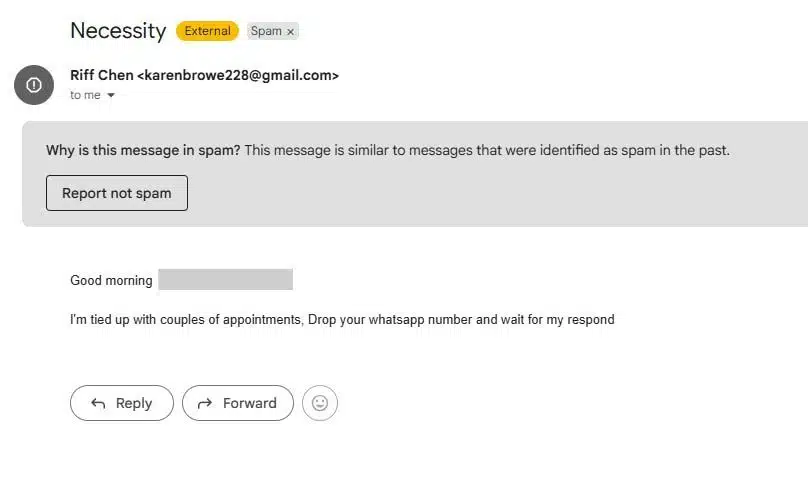
Of course, not all scammers are this obvious, so you should be careful even if a message appears legit or professional.
3. The Message Promises Guaranteed Google Rankings
Be careful with claims such as:
- “We can get you number one on Google in seven days.”
- “Guaranteed first page ranking.”
- “We can push your website above your competitors immediately.”
Google’s own guidance says no one can guarantee a number-one ranking on Google. A credible SEO provider should explain its process without promising full control over organic rankings.
What to do: Ask for the scope of work, timeline, reporting method, and examples of deliverables.
4. The Sender Claims Special Google Access
Some messages may claim that the agency works directly with Google to push websites higher in organic search. Some agencies may be Google Partners for Google Ads, but that does not mean they can control organic search rankings.
What to do: Treat “special Google access,” “priority ranking,” or “inside Google connection” claims with caution.
5. The Audit Link or Attachment Looks Risky
Fake SEO emails often include audit links, PDF reports, spreadsheets, zip files, or login pages. These may lead to phishing pages, malware downloads, or fake login screens.
What to do: Do not open links or attachments until the sender is verified. Ask IT support to inspect the message if needed.
6. The Payment Request Feels Rushed
A scammer may send a fake invoice for an SEO audit, backlink package, technical fix, monthly retainer, or urgent website recovery work. Warning signs include unfamiliar bank details, an individual account instead of a company account, or pressure to pay immediately.
What to do: Check whether the invoice name, company details, bank account, and payment instructions match the verified vendor. Confirm any bank detail change through a second channel.
7. They Ask for Website or Google Access Too Early
Real SEO work may require access to Google Analytics, Google Search Console, WordPress, Shopify, hosting, or Google Business Profile. But access should only come after the agency has been verified, the scope is agreed, and the reason for access is clear.
What to do: Give only the access needed for the task. Avoid full admin access unless it is genuinely required.
What to Do If You Receive a Suspicious Message
If you receive a suspicious SEO email, WhatsApp message, LinkedIn message, invoice, or access request, do not click, reply, pay, or share access immediately.
Use this response checklist:
- Do not click links or download attachments.
- Do not reply with sensitive business information.
- Take a screenshot of the message.
- Expand the full sender email address.
- Check the reply-to address.
- Look for unusual domains, spelling, payment details, or urgent wording.
- Verify the agency through its official website.
- Contact the supposed sender through a separate trusted channel.
- Inform your manager, IT team, finance team, or marketing lead.
- Block or report the sender if the message is confirmed suspicious.
If money has already been transferred, act quickly. Contact your bank or NSRC 997 first so immediate action can be taken, then make a police report as soon as possible.
Keep evidence such as screenshots, email headers, sender addresses, URLs, bank details, phone numbers, invoices, chat records, and suspicious attachments.
If you already clicked a suspicious link, close the page and avoid entering more information. Change relevant passwords, enable two-factor authentication, scan your device, and alert your IT or admin team. If you entered login details, assume the account may be compromised and revoke suspicious sessions or access immediately.
How Businesses Can Protect Themselves
Businesses can reduce the risk of SEO agency impersonation scams by making verification part of the normal workflow. The goal is to prevent one rushed message from causing financial loss, account compromise, or data exposure.
Use a Two-Channel Confirmation Rule
If a request arrives by email, confirm it through another trusted channel before acting. This is especially important for:
- New vendor requests
- Payment requests
- Bank account changes
- Website access
- Google account access
- Hosting or domain access
- Urgent instructions from managers
- Requests to download files or log in through new links
Do not confirm by replying directly to the suspicious message. If the email is fake, the reply goes back to the scammer.
Keep an Approved Vendor List
Create a shared list of approved SEO agencies, freelancers, marketing vendors, web developers, and other digital service providers.
Include the company name, contact person, official email domain, phone number, approved payment details, services provided, internal owner, and contract status.
This helps staff check new requests and helps finance or marketing teams spot fake invoices or unfamiliar bank details.
Limit Access by Role
Do not give every vendor full admin access. Use lower permission levels where possible.
| Platform | Safer Access Approach |
| Google Analytics | Give viewer or analyst access if editing is not needed |
| Google Search Console | Add only verified users who need access |
| WordPress | Use editor, SEO manager, or temporary admin access where appropriate |
| Shopify | Give staff permissions based on the actual task |
| Hosting | Avoid sharing master credentials unless absolutely necessary |
| Google Business Profile | Add managers instead of transferring ownership unnecessarily |
Remove vendor access when the project ends. Review old user accounts after staff changes, agency changes, or website redesigns.
Read More: Local SEO Ranking Factors: Rank Higher in “Near Me” Searches
Train Staff With Real Examples
Show staff examples of fake sender domains, lookalike agency names, suspicious invoices, fake audit links, urgent access requests, guaranteed ranking messages, fake manager instructions, and copied agency branding.
Prioritise training for business owners, marketing managers, admin staff, finance teams, and website managers because they are most likely to reply, approve payment, or grant access.
Slow Down Urgent Requests
Scammers create urgency because they do not want people to check. Any message that says “urgent,” “final warning,” “pay today,” “reply now,” or “your website will disappear” should be reviewed carefully.
A real SEO agency should be comfortable with verification. If someone becomes defensive, refuses to explain, or pressures your team to act before checking, pause.
What Should a Real SEO Agency Be Able to Show?
A credible SEO agency should be able to explain what they do, why they need access, how progress will be measured, and what results are realistic.
A real SEO agency should be able to provide:
- Official website
- Company email address
- Clear contact details
- Proposal or scope of work
- Reporting sample
- Case studies or work examples
- Realistic timeline
- Clear pricing
- Access requirements
- Communication process
A real agency may ask for access, but it should explain why. It may recommend technical SEO work, but it should explain the issue. It may suggest a retainer, but the invoice should match the agreed scope and verified company details.
If the person refuses to explain, pressures you to pay first, or asks for full admin access before any agreement is in place, treat the request as suspicious.
How Is This Different From a Bad SEO Agency?
An SEO impersonation scam is mainly about identity fraud. The person contacting you may not be from the agency they claim to represent, or the agency may not exist at all.
A bad SEO agency may be a real business that delivers weak work, uses risky tactics, communicates poorly, or overpromises results. There can be overlap because scammers often use shady SEO promises to sound convincing. But if the sender’s identity cannot be verified, treat it as a scam risk first.
A bad agency may waste your marketing budget. An impersonation scam may steal your money, login access, business data, or customer trust.
Keeping Your Business Safe
SEO agency impersonation scams are easier to avoid when your team has a clear verification process. Do not rely only on how professional the message looks. Scammers can copy logos, names, SEO terms, and invoice formats.
Before replying, paying, clicking, or granting access, check the sender, company, offer, invoice, and access request. Use a second channel for anything involving money, website access, hosting, Google tools, or business accounts.
If your business wants SEO help from a verified team rather than a suspicious cold email, you can explore Rankpage and its SEO services through the official website. A A proper SEO partner should be transparent about what they do, how they report, and what your business can realistically expect.
Sources
- Bank Negara Malaysia, Annual Report 2025 scam impact context
- National Scam Response Centre Malaysia, official scam-response guidance
- Google Search Central, “Do You Need an SEO?”
- Google Partners Programme, official Google Ads partner guidance
- Google Search Central, SEO Starter Guide
- NIST, least privilege definition
Frequently Asked Questions About Spotting an SEO Agency Impersonation Scam
What Is an SEO Agency Impersonation Scam?
An SEO agency impersonation scam happens when a scammer pretends to be an SEO agency, SEO consultant, vendor, or known company representative to gain trust. The goal may be to get payment, steal website access, spread malware, or collect sensitive business information.
How Do SEO Impersonation Scams Usually Work?
They usually start with a believable message about rankings, audits, website errors, invoices, or SEO opportunities. The scammer then creates urgency and asks the business to click a link, open a file, pay an invoice, or share account access.
What Are the Warning Signs of an SEO Impersonation Scam?
Warning signs include mismatched email domains, unfamiliar payment details, guaranteed Google ranking claims, “special Google access,” risky audit links, urgent payment deadlines, and requests for full admin access before an agreement is in place.
What Should I Do If I Receive a Suspicious SEO Message?
Do not click, reply, pay, or share access immediately. Take screenshots, check the full sender email, verify the agency through official channels, contact the supposed sender separately, and alert your manager, IT team, finance team, or marketing lead.
What Should I Do If I Already Paid or Clicked a Suspicious Link?
If money was transferred, contact your bank or NSRC 997 first, then make a police report. If you clicked a suspicious link, close the page, change relevant passwords, enable two-factor authentication, scan your device, and alert your IT or admin team.
How Can Businesses Protect Themselves From SEO Agency Impersonation Scams?
Use a two-channel confirmation rule, keep an approved vendor list, verify invoices and access requests, limit vendor permissions, train staff with real examples, and slow down urgent requests.