
Optimising product variants means giving shoppers access to useful options while deciding which URLs should be crawlable, indexable and treated as the preferred version of substantially similar pages.
That matters for Malaysian ecommerce businesses selling products in different colours, sizes, capacities, materials, flavours or pack sizes.
Imagine a running shoe available in six colours and eight sizes. Add variant parameters, sorting URLs, tracking links and filters, and one product can quickly generate dozens of URLs.
Duplicate content itself is not automatically a Google spam violation. The bigger issue is that multiple similar URLs can make crawling, indexing and performance tracking less efficient.
In ecommerce SEO, the solution is not to remove variants. It is to structure them properly.
What Are Product Variants in Ecommerce?
Product variants are different versions of the same core product.
A T-shirt may come in several colours and sizes, while a smartphone may be sold with different storage capacities.
From a customer perspective, those differences matter. From a search engine perspective, some variants may still represent essentially the same product.
The key question is:
Does each variant deserve its own search landing page, or should search engines mainly treat the variants as one product?
There is no universal answer. It depends on how different the variants are, whether each page provides unique value and whether people search for them independently.
How Can Product Variants Create Duplicate Content?
Duplicate content issues often appear when an ecommerce platform creates multiple URLs that display nearly identical information.
For example:
example.com/products/cotton-shirt
example.com/products/cotton-shirt?colour=blue
example.com/products/cotton-shirt?size=large
example.com/products/cotton-shirt?colour=blue&size=large
If each version uses the same title, description, reviews and product copy, search engines may discover several substantially similar URLs.
Additional parameters can make this worse:
?sort=price
?ref=homepage
?utm_source=campaign
?filter=blue
Google describes canonicalisation as the process of selecting a representative URL from a group of duplicate or substantially similar pages.
Site owners can provide signals indicating which URL they prefer.
Should Every Product Variant Have Its Own URL?
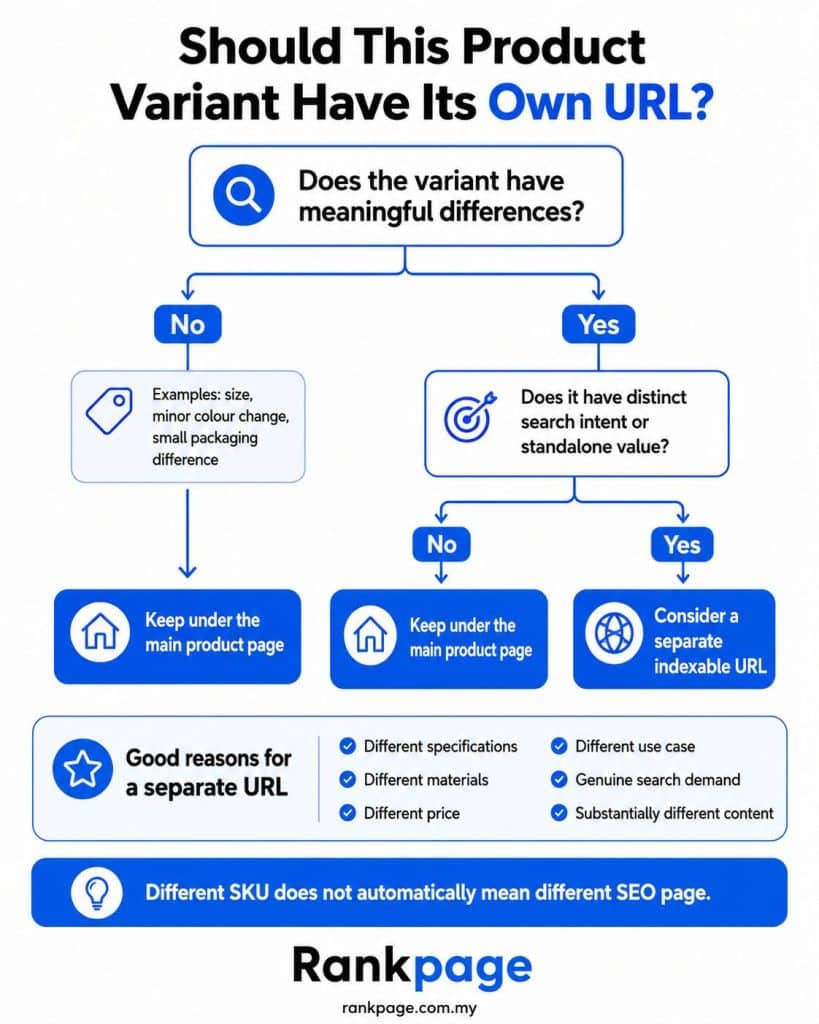
Usually, no. Creating a separate indexable URL for every colour, size or minor variation can result in hundreds or thousands of low-value pages.
A useful way to decide is to look at search intent and standalone value.
| Variant Situation | Typical SEO Approach |
|---|---|
| Same shirt, different sizes | Keep under one product page |
| Same shirt, several colours | Usually keep together |
| Laptop with 256GB vs 1TB storage | Separate URLs may be useful |
| Skincare product in 30ml vs 50ml | Usually one main page |
| Men’s and women’s versions | Separate pages may make sense |
| Limited-edition design | Separate page may be justified |
Ask:
Would someone deliberately search for this version, and does the page contain enough unique information to satisfy that search?
When a variant has meaningful independent demand and distinct information, a dedicated URL can make sense. Otherwise, consolidating SEO signals around the main product is usually cleaner.
How Should You Use Canonical Tags for Product Variants?
Canonical tags signal which URL should represent duplicate or substantially similar pages.
They can help Google consolidate signals around a preferred URL, but they do not directly stop other URLs from being crawled or indexed.
There are two common approaches.
Canonicalise Variants to the Main Product
This works well when variant pages are almost identical and you mainly want one product URL represented in search.
For example:
/running-shoe?colour=black
/running-shoe?colour=white
/running-shoe?colour=red
could all reference /running-shoe as the canonical URL.
Use Self-Referencing Canonicals for Meaningful Variants
If each variant has its own useful landing page and independent search intent, each URL may use a self-referencing canonical.
For example:
/phone-256gb
/phone-512gb
may remain separate when their specifications, pricing or user intent differ enough.
Canonical tags are signals rather than absolute commands, so your internal links, sitemap entries and canonical tags should all support the same preferred URLs.
What URL Structure Works Best?
Variant URLs should be predictable and consistent.
Avoid multiple formats representing the same option:
/shoe-blue
/shoe?colour=blue
/shoe?variant=123
/blue/shoe
If variants do not need independent indexing, parameter-based URLs can work well for shopper selection, provided your canonical tags, internal links and sitemap consistently support the primary product URL.
Shopify, for example, supports variant-specific links using:
/products/product-name?variant=variant-id
Shopify also provides canonical URL functionality through its theme system.
For custom or heavily modified ecommerce sites, check that variant selectors do not generate large numbers of unnecessary crawlable URLs.
How Can Structured Data Help?
Structured data gives search engines machine-readable information about products and their relationships.
Google supports product variant markup using properties such as:
- ProductGroup
- hasVariant
- variesBy
- productGroupID
- isVariantOf
This can help Google understand that several products belong to one broader product group.
For example:
Product group: Running Shoe Model XVaries by: Colour and sizeVariant: Black, UK Size 8Variant: White, UK Size 8
Structured data can also describe price, availability, SKU and other product details.
However, schema does not fix poor URL architecture.
If your store generates thousands of unnecessary parameter URLs or conflicting canonicals, structured data will not solve those issues by itself.
How Should Ecommerce Platform Settings Be Configured?
Many duplicate content problems are generated automatically by ecommerce platforms, themes or plugins.
A product might appear through:
- The main product URL.
- Variant parameter URLs.
- Category pages or collection pages.
- Search result URLs.
- Filtered navigation.
- Tracking parameters.
Shopify automatically provides canonical functionality as part of its built-in SEO setup, but custom themes and apps can still affect URL behaviour.
WooCommerce stores may also generate additional URLs through filters, layered navigation, attribute archives and custom permalink structures.
After significant theme, plugin or product-functionality changes, check which URLs are actually being generated.
Read This:How to Optimise Category Pages for SEO
When Should Variants Have Unique Content?
If you want a variant to rank independently, give search engines a genuine reason to treat it independently.
Changing only the colour name in the title is rarely enough.
A standalone variant page may justify separate treatment when it has meaningful differences in:
- Specifications
- Materials
- Images
- Availability
- Price
- Use case
- Product description
Unique content should reflect real product differences, not exist only to make two URLs appear different.
What Should You Do With Faceted Navigation URLs?
Faceted navigation lets shoppers filter products by options such as:
- Colour
- Size
- Price
- Brand
- Material
These combinations can create thousands of possible URLs.
Some may have real search value. For example:
/running-shoes/womens/black
could potentially be useful if it satisfies meaningful search demand.
A highly specific filter combination such as:
?colour=black&size=7&price=200-250&material=mesh&sort=popular
usually has far less value as a search landing page.
The goal is to distinguish between valuable category combinations and functional filters created mainly for shoppers.
Google warns that faceted navigation can create very large crawl spaces. If filter URLs do not need to be indexed, crawl management may also be necessary.
Canonical tags can help communicate similarity, but they should not be treated as the only way to manage a large faceted-navigation system.
Read This: Faceted Navigation Guide in Ecommerce SEO
Should You Use Noindex Instead of Canonical Tags?
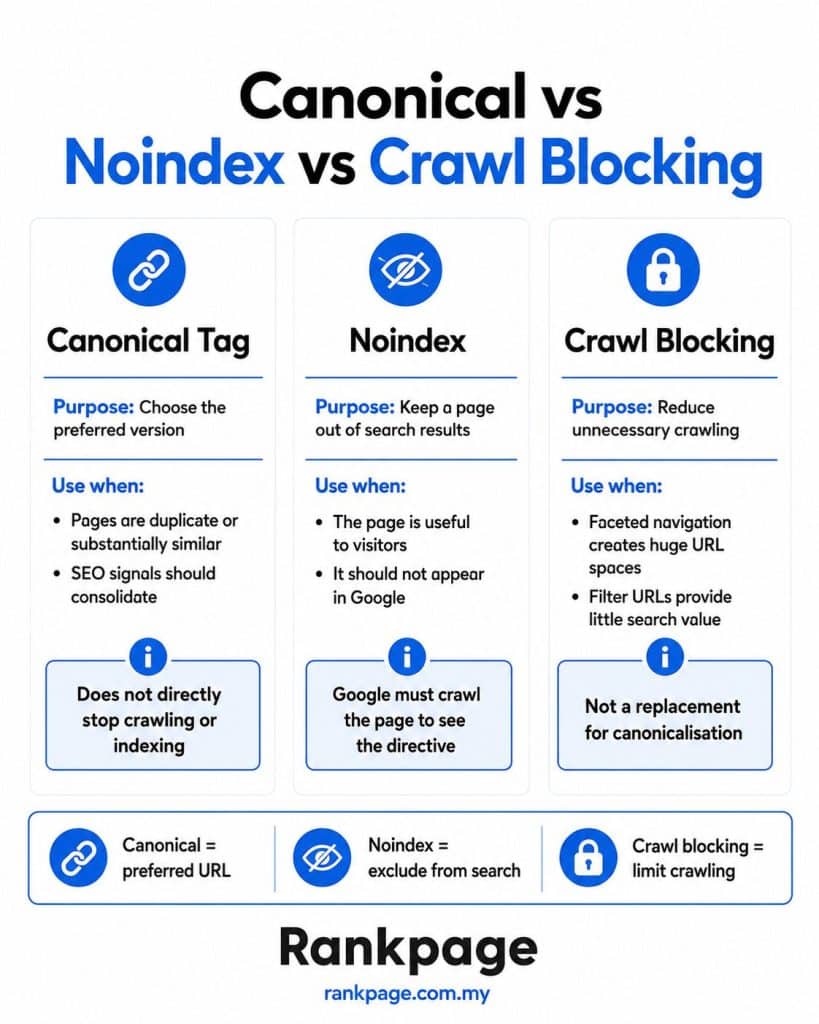
Not automatically. Canonicalisation and noindex serve different purposes.
A canonical tells Google which URL you prefer as the representative version of similar pages.
A noindex directive tells Google not to include a particular page in search results.
If duplicate variant URLs should consolidate around one primary product, canonicalisation may be appropriate.
If a page is useful to customers but should not appear in search, noindex may be more suitable.
However, noindex does not prevent crawling because Google must access the page to see the directive.
For very large low-value URL spaces, crawl controls may be more appropriate.
Do not treat canonicalisation, noindex and crawl blocking as interchangeable.
How Can You Audit Product Variant Duplicate Content?
A practical audit can follow these steps:
Step 1: Choose products with several variants.
Step 2: Change the options and watch whether the URL changes.
Step 3: Inspect the canonical tag.
Step 4: Compare how much content actually changes between variants.
Step 5: Check whether internal links point consistently to your preferred URLs.
Step 6: Review your XML sitemap.
Step 7: Use Google Search Console’s URL Inspection tool to compare your declared canonical with Google’s selected canonical.
Step 8: Check whether filters or parameters are creating large numbers of low-value crawlable URLs.
For larger ecommerce websites, SEO crawling tools can reveal these patterns much faster.
What Are the Most Common Product Variant SEO Mistakes?
Common problems include:
- No clear rule for when variants deserve separate URLs.
- Canonical tags pointing to the wrong product.
- Non-canonical parameter URLs appearing in XML sitemaps.
- Internal links pointing to multiple versions of the same product.
- Thin variant pages created only to target minor keyword differences.
- Filters creating huge crawlable URL spaces.
- Using canonical tags, noindex and crawl controls as if they do the same thing.
There is also the opposite mistake: canonicalising genuinely useful variants that could satisfy independent searches.
The goal is not to remove every variant from the index.
It is to ensure that every indexable URL deserves to be there.
What Is the Best Product Variant SEO Strategy?
For most Malaysian ecommerce businesses, a simple framework works well:
Minor differences: Keep variants under one primary product page.
Meaningful differences: Consider dedicated URLs when variants have distinct specifications or search intent.
Duplicate URLs: Consolidate signals using consistent canonicalisation.
Structured data: Add appropriate product variant markup.
Platform-generated URLs: Audit filters, parameters, apps and themes.
Faceted navigation: Limit unnecessary crawl and index bloat.
Indexable pages: Make sure every page provides enough standalone value.
You do not need the maximum number of pages.
You need the right pages.
A catalogue with 2,000 carefully structured URLs can be much easier for search engines and customers to understand than one producing 50,000 near-identical combinations.
Optimising Your Product Variants
Product variants are not inherently an SEO problem. Problems arise when ecommerce systems turn minor choices into large numbers of duplicate or near-duplicate URLs without clear canonicalisation, indexing rules or crawl management.
Keep closely related options together, give meaningful variants their own pages only when justified, use consistent canonical tags, implement appropriate structured data and regularly inspect what your platform is generating.
For Malaysian ecommerce businesses with large product catalogues, partnering with an experienced SEO agency can make a difference. A cleaner product structure makes it easier for both search engines and customers to understand what your store offers.
Sources
- Google Search Central — URL Canonicalisation
- Google Search Central — Canonicalisation Methods
- Google Search Central — Canonicalisation Troubleshooting
- Google Search Central — Product Variant Structured Data
- Google Search Central — Product Structured Data
- Google Crawling Infrastructure — Faceted Navigation Guidance
- Shopify Developer Documentation
- Shopify SEO Documentation
- WooCommerce Documentation
Frequently Asked Questions About Optimising Product Variants Without Creating Duplicate Content
Does Duplicate Content Hurt Ecommerce SEO?
Duplicate content is not automatically a Google spam violation, but large numbers of similar URLs can make crawling, indexing and performance tracking less efficient.
Should Product Variants Have Separate URLs?
Only when they have meaningful differences, standalone value or distinct search intent.
Should Product Variants Use Canonical Tags?
Often, yes. Similar variant URLs can point to a preferred canonical, while genuinely independent variants can use self-referencing canonicals.
Does Shopify Create Duplicate Product Variant URLs?
Shopify supports variant-specific parameter URLs and built-in canonical functionality. Custom themes and apps should still be checked.
Can Product Schema Prevent Duplicate Content?
No. Structured data helps search engines understand variant relationships, but it does not replace good URL architecture, canonicalisation or crawl management.
Should Every Colour Variant Have Its Own Product Page?
Usually not. Separate colour pages make more sense when the colour has genuine search demand or meaningful differences that justify a standalone page.