WordPress is often the stronger option for Malaysian businesses that expect to publish substantial content, invest in SEO services, add specialised functions or expand their digital operations.
Wix may be more suitable for businesses that want a straightforward website without managing hosting, software updates or technical settings.
The right choice depends on what the website needs to do. A home-based baker has different requirements from a retailer managing hundreds of products or a company targeting competitive Google searches.
What Is the Main Difference Between WordPress and Wix?
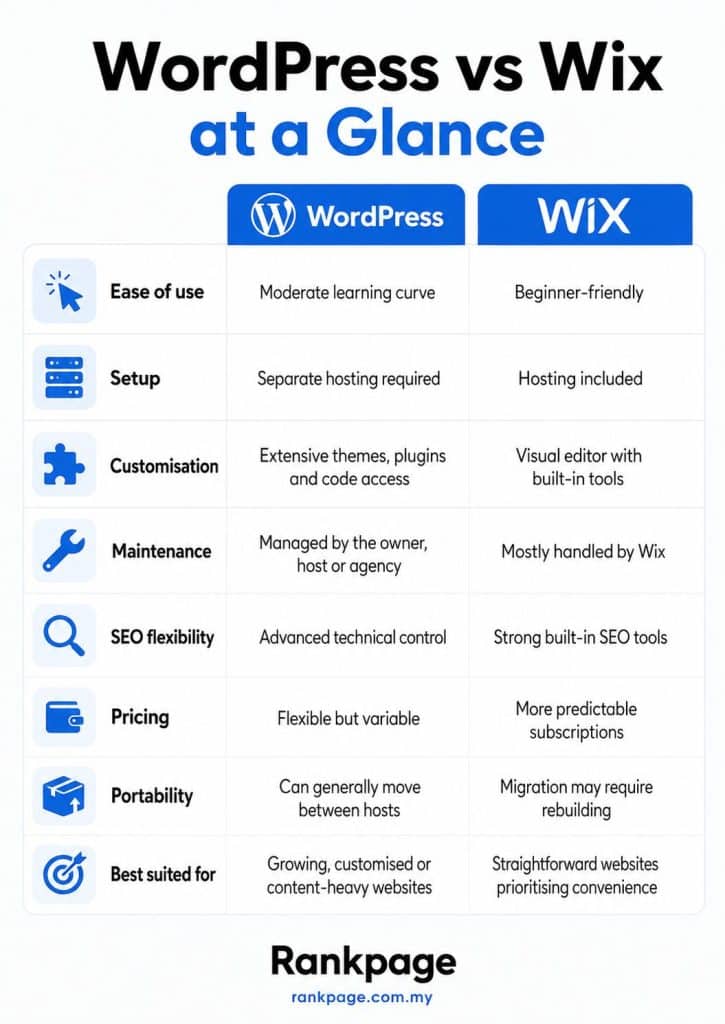
WordPress is an open-source content management system installed on separate hosting. The software is free, while hosting, domains, premium themes, plugins and professional support may add costs.
Wix is a hosted website builder. Its plans combine a visual editor, hosting, security and routine platform maintenance within one account.
In simple terms:
Wix provides a packaged service: Most technical infrastructure is managed for you.
WordPress provides a flexible framework: You have greater control over hosting, code, extensions and how the website operates.
This comparison focuses on self-hosted WordPress.org rather than WordPress.com.
Which Website Builder Is Easier to Use?
Wix is generally easier for beginners.
Its visual editor lets users place text, images, buttons and other elements without editing code. Hosting, SSL certificates and core platform updates are also managed within Wix.
WordPress involves more setup. Businesses usually need to choose hosting, connect a domain, configure a theme, install plugins and arrange backups and security.
The WordPress dashboard becomes easier once configured, but the range of themes, plugins and page builders can overwhelm beginners.
Usability winner: Wix
Wix is easier to learn immediately. WordPress takes more effort upfront but offers more control later.
Which Platform Offers Better Features and Flexibility?
WordPress is stronger when a business needs extensive customisation or specialised functions.
Its theme and plugin ecosystem supports contact forms, directories, bookings, multilingual pages, memberships, online courses, ecommerce and many other functions. Developers can also build custom features when existing plugins are insufficient.
Read More: How UI UX Impact SEO for Malaysian Businesses in 2026
A WordPress website could begin as a simple company site before adding an online store, multilingual pages, customer accounts, appointment scheduling, CRM integrations or a searchable catalogue.
Wix also supports blogs, ecommerce, bookings, events, memberships and marketing. These features are often easier to activate because they are built for the same managed platform.
The main distinction is architectural control. Wix users work within Wix’s ecosystem, while self-hosted WordPress users have greater access to hosting, code and website configuration.
Flexibility winner: WordPress
Wix covers many common business needs. WordPress is usually better for specialised integrations and custom development.
Which Website Builder Has Better Design Options?
Wix offers a visual editor that is easy for non-designers. Users can select a template and move elements around without editing code.
This provides speed and creative freedom, but poorly managed layouts may create inconsistent spacing, typography or mobile design.
WordPress design depends on the chosen theme and editing tools. Businesses can use ready-made templates, page builders or a fully custom design.
Wix Is Better For:
- Fast visual editing.
- Straightforward websites.
- Users without development experience.
- Businesses making simple internal changes.
WordPress Is Better For:
- Custom page templates.
- Consistent design systems.
- Greater layout and code control.
- Websites with many page types.
Design flexibility winner: WordPress
Wix is easier for quick visual changes, while WordPress offers a higher customisation ceiling.
How Much Do WordPress and Wix Cost?
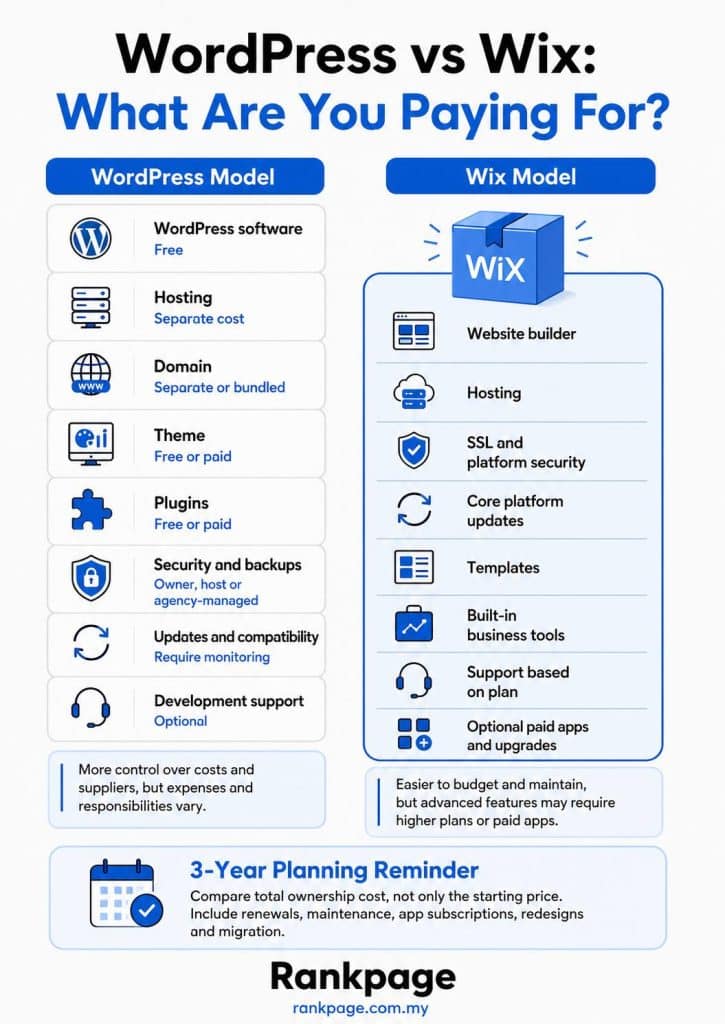
Wix is easier to budget because many costs are packaged into subscriptions. WordPress costs depend on hosting, themes, plugins and development requirements. A basic WordPress site using affordable hosting and free plugins can be inexpensive, but a professionally developed site with premium tools and ongoing support will cost more.
Wix has more predictable expenses, although higher plans, paid apps, renewals and additional services can increase the total.
Malaysian businesses should compare costs over two or three years rather than focusing only on the lowest advertised price.
Pricing winner: Draw
Wix is easier to budget. WordPress provides more control over where the budget is spent.
Which Platform Requires Less Maintenance?
Wix requires less hands-on maintenance.
It manages hosting infrastructure, core updates and many platform-level security tasks. Users do not need to manually update a content management system or check plugin compatibility.
WordPress owners must manage:
- Core, theme and plugin updates.
- Backups and security.
- Hosting performance.
- Compatibility checks.
- Occasional technical troubleshooting.
These tasks can be handled internally, by a managed host or through an agency. WordPress also supports automatic updates, although important changes should still be monitored.
Maintenance winner: Wix
Which Website Builder Is Better for SEO?
WordPress generally offers greater freedom for customised technical SEO, while both platforms can support long-term SEO when properly configured.
Wix lets users manage title tags, meta descriptions, URLs, redirects, structured data and indexing settings. It also provides automated sitemaps and Google Search Console connectivity.
Read More: Why SEO and Web Design Must Be Planned Together in 2025
A well-built Wix website can achieve strong search visibility. The platform does not inherently prevent a site from ranking.
WordPress provides more implementation options through SEO plugins, hosting access and custom code. This can help with:
- Large content libraries.
- Ecommerce categories.
- Multilingual websites.
- Location pages.
- Advanced schema.
- Core Web Vitals improvements.
- Complex indexing and canonical requirements.
WordPress does not rank better automatically. A poorly built WordPress site may perform worse than a properly optimised Wix site.
SEO flexibility winner: WordPress
Its advantage is technical control, not guaranteed rankings.
Which Website Builder Scales Better?
Self-hosted WordPress generally provides greater infrastructure and code-level flexibility as website requirements grow.
Businesses can move to more capable hosting, connect external systems and modify the website at code level. Themes, plugins and components can also be replaced, although this depends on how the site was built.
This flexibility can help when a website expands to include multiple languages, regional landing pages, advanced ecommerce, customer portals, large content libraries or custom integrations.
Wix can support professional business websites and online stores. Constraints are more likely when a project requires unsupported integrations, direct server control or infrastructure outside Wix’s managed platform.
Portability is another consideration. A WordPress site can generally move between compatible hosts. Moving away from Wix often requires rebuilding parts of the design and functionality.
Infrastructure and customisation winner: WordPress
What Are the Pros and Cons of WordPress?
WordPress Pros
Control: Choose your hosting, themes, plugins and technical setup.
Functionality: Add standard or custom features as the business grows.
SEO Flexibility: Make detailed technical and on-page changes.
Portability: Move between compatible hosting providers.
Scalability: Support large content, ecommerce or custom websites with the right infrastructure.
WordPress Cons
Learning Curve: Setup can confuse beginners.
Maintenance: Updates, backups and security require attention.
Variable Quality: Poor themes or plugins may affect performance.
Costs: Hosting, premium tools and support may be billed separately.
What Are the Pros and Cons of Wix?
Wix Pros
Easy Setup: Hosting and editing are combined.
Visual Editor: Most changes can be made without coding.
Lower Maintenance: Wix manages the core platform.
Built-In Tools: Forms, bookings, marketing and ecommerce are available.
Predictable Pricing: Main platform costs are easier to estimate.
Wix Cons
Less Infrastructure Control: Hosting and server settings are limited.
Limited Portability: Migration may require rebuilding.
App Costs: Some functions require paid tools or upgraded plans.
Customisation Limits: Highly specialised requirements may exceed the platform.
Who Should Choose Wix?
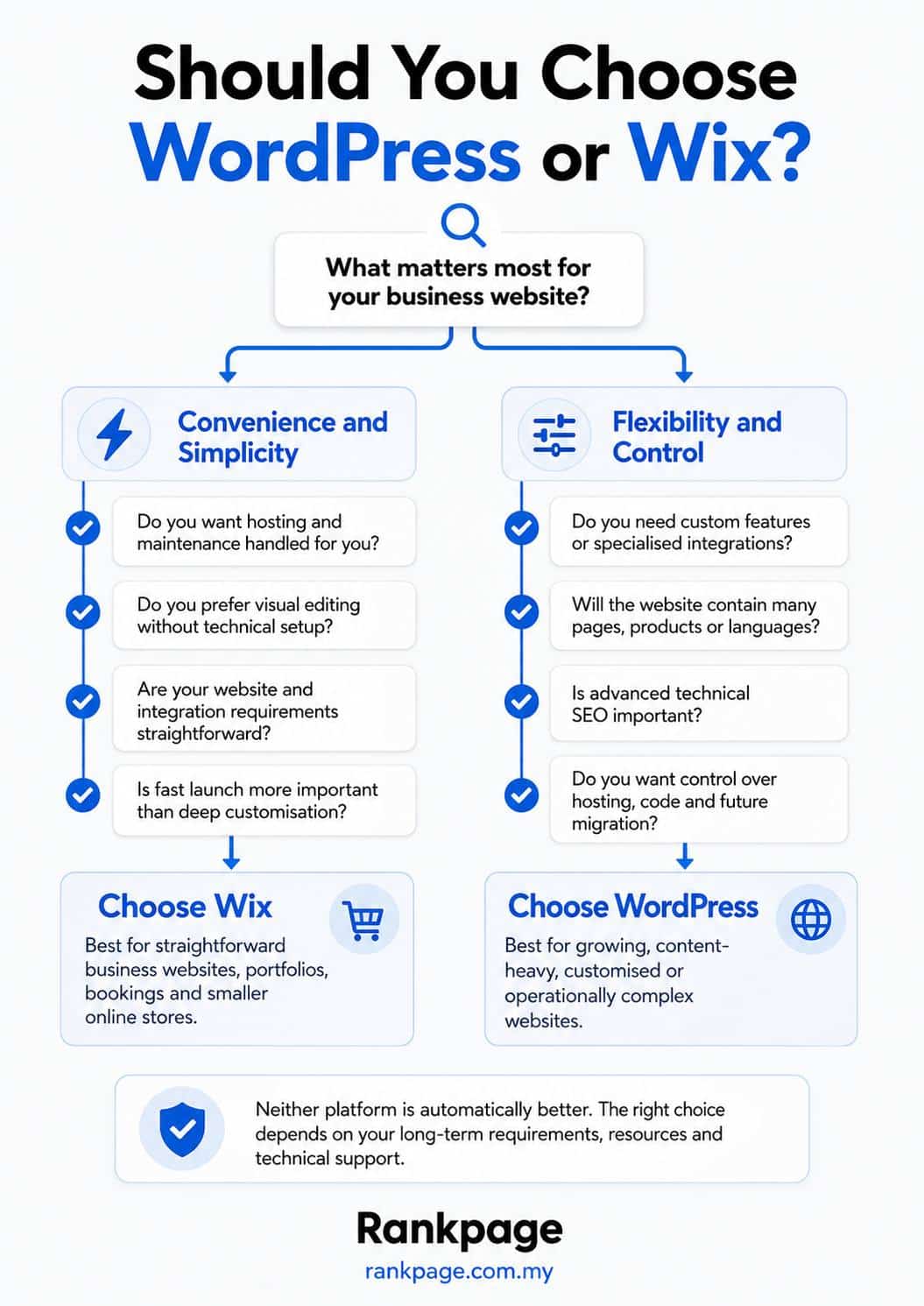
Wix suits businesses that need a straightforward online presence without highly specialised technical requirements.
It is particularly suitable for freelancers, consultants, home-based businesses, local service providers, new businesses and companies without technical support.
Choose Wix when ease of management matters more than portability, infrastructure control or extensive custom development.
Who Should Choose WordPress?
WordPress suits businesses that view their website as a long-term marketing and operational asset.
It is often a better fit for companies investing in SEO, ecommerce, regular content publishing or custom functionality.
Choose WordPress when the business expects to:
- Publish many service or product pages.
- Target competitive searches.
- Expand into new markets.
- Add custom tools or integrations.
- Change hosts or developers later.
- Require more technical control.
The platform requires more maintenance but provides greater room for customisation and growth.
Which Website Builder Should You Choose?
Neither platform is the best choice for every Malaysian business.
Wix is stronger for ease of use, predictable platform costs and lower hands-on maintenance. It suits businesses that want an integrated website service without extensive technical control.
WordPress is stronger for customisation, portability and technical flexibility. It is more likely to suit businesses whose content, integrations and digital operations are expected to become complex.
Rankpage SEO Agency helps businesses improve search visibility through technical optimisation, content strategy and ongoing SEO services. Whether your website runs on WordPress or Wix, the quality of its structure, content, performance and SEO implementation matters more than the platform name alone.
Frequently Asked Questions About WordPress vs Wix
Is WordPress Better Than Wix?
WordPress is usually better for businesses requiring extensive customisation, hosting control or specialised integrations. Wix is usually better for beginners and teams prioritising convenience.
Is Wix or WordPress Better for SEO?
WordPress offers greater technical SEO flexibility, but it does not rank better automatically. Wix provides strong built-in SEO tools and can achieve good search visibility when properly configured.
Is WordPress More Expensive Than Wix?
Not necessarily. WordPress software is free, but hosting, domains, premium extensions and maintenance may increase the total cost. Wix uses more predictable subscriptions, although paid apps and plan upgrades can add costs.
Can I Move My Wix Website to WordPress?
Yes, but the full design and functionality will not usually transfer automatically. Some pages, templates and features may need to be rebuilt.
Is Wix Suitable for a Malaysian Small Business?
Yes. Wix can suit Malaysian businesses that need a company website, portfolio, booking system or online store without extensive technical management.
Should I Choose WordPress or Wix for an Online Store?
Wix is convenient when its built-in store features meet the business’s needs. WordPress with WooCommerce is generally more flexible for specialised product structures, checkout rules and integrations.