Location pages should help users, not simply help businesses target more keywords.
Many Malaysian businesses create dozens of pages by copying the same content and replacing “Kuala Lumpur” with “Johor Bahru,” “Penang” or “Shah Alam.” Repetition alone is not automatically a Google spam violation, but highly similar pages may provide a poor user experience and create doorway-page risks.
A strong location page should answer one question:
Why should someone in this area visit this page instead of another page on the website?
Whether you operate physical branches or serve customers across several cities, location pages can support local SEO when they provide accurate and useful information.
How Should Location Pages Be Structured to Rank?
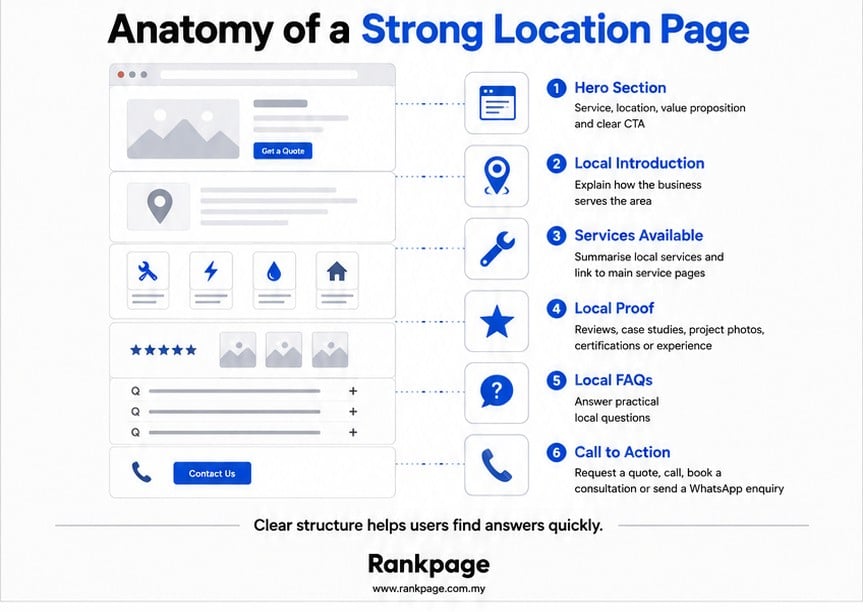
Location pages do not need thousands of words. Users usually want clear answers, relevant proof and an easy next step.
Hero Section
Immediately explain:
- What service you offer
- Which location you serve
- Who the service is for
- What the visitor should do next
Local Introduction
Explain how your business operates in the area.
You may mention:
- Branch information
- Service coverage
- Local experience
- Customer types served
Services Available
Summarise the services available in that location.
Avoid copying entire service pages. Describe what is locally relevant and link to the main service pages for more detail.
Local Proof
Include evidence such as:
- Reviews
- Testimonials
- Case studies
- Completed projects
- Relevant certifications
Frequently Asked Questions
Answer real questions customers in the area may have.
Call to Action
Encourage users to:
- Request a quote
- Call your team
- Book a consultation
- Send a WhatsApp enquiry
What Content Should a Location Page Include?
Local Service Information
Explain how your services apply to the target location.
For example, a commercial solar page targeting Penang may discuss factories and industrial parks. A local SEO page targeting Kuala Lumpur may discuss competition across the Klang Valley.
Read More: Local SEO Ranking Factors: Rank Higher in “Near Me” Searches
Customer Reviews
Genuine, location-relevant reviews can strengthen trust.
A testimonial describing a completed project in Petaling Jaya may be more useful to nearby customers than a generic comment. Reviews should be authentic and should not be used merely to repeat location keywords.
Case Studies
Where possible, include examples of work completed in the target market.
For example:
Client: Manufacturing company
Location: Shah Alam
Challenge: High electricity costs
Solution: Commercial solar installation
Outcome: Reduced reliance on grid electricity
Use measured results only when they can be verified.
Team and Images
For physical branches, introduce the local team and use genuine photographs where possible.
Useful images include:
- Branch exterior
- Team members
- Project photographs
- Vehicles
- Facilities
Avoid using the same stock images across every location page.
Directions and Coverage
For physical branches, include directions, parking details, landmarks and opening hours.
For service-area businesses, explain:
- Areas covered
- Appointment arrangements
- Travel limitations
- Whether on-site visits are available
Do not imply that a physical office exists when customers cannot visit that location.
How Can You Use Templates Safely?
Templates are not inherently a problem.
Most businesses need a consistent structure to manage several locations efficiently. The goal is to reuse the layout while customising the important local details.
| Safe to Reuse | Should Be Localised |
|---|---|
| Layout | Introduction |
| Navigation | Reviews |
| Forms | Photographs |
| CTA design | Case studies |
| Brand information | Coverage details |
| General service overview | FAQs |
A useful test is:
If someone compares two location pages, will each page give them meaningful information about that area?
When the answer is no, the pages may need stronger localisation, consolidation or removal.
Read More: Why Your Business Is Not Showing on Google Maps (And How to Fix It)
How Should URLs, Titles and Headings Be Optimised?
No individual on-page element guarantees rankings, but clear URLs, titles and headings help users and search engines understand the page.
URL Structure
Keep URLs short and readable.
Examples:
- /seo-services-kuala-lumpur/
- /commercial-solar-penang/
- /accounting-services-johor-bahru/
Avoid:
- /best-top-affordable-seo-agency-services-kuala-lumpur-malaysia/
Title Tags
A simple formula is:
Service + Location + Brand
Example:
SEO Services in Kuala Lumpur | Rankpage
Main Heading
Give the page one clearly identifiable main heading.
Using an H1 is a sensible convention, although search engines do not require exactly one H1.
Example:
SEO Services for Businesses in Kuala Lumpur
Meta Descriptions
Summarise what you offer, where you offer it and why the page is useful.
Search engines may still generate a different snippet from the page content.
Image Alt Text
Describe images naturally.
Good:
“Rankpage SEO team meeting with a client in Kuala Lumpur”
Bad:
“SEO Kuala Lumpur SEO agency KL local SEO Malaysia”
Should Every Location Get Its Own Page?
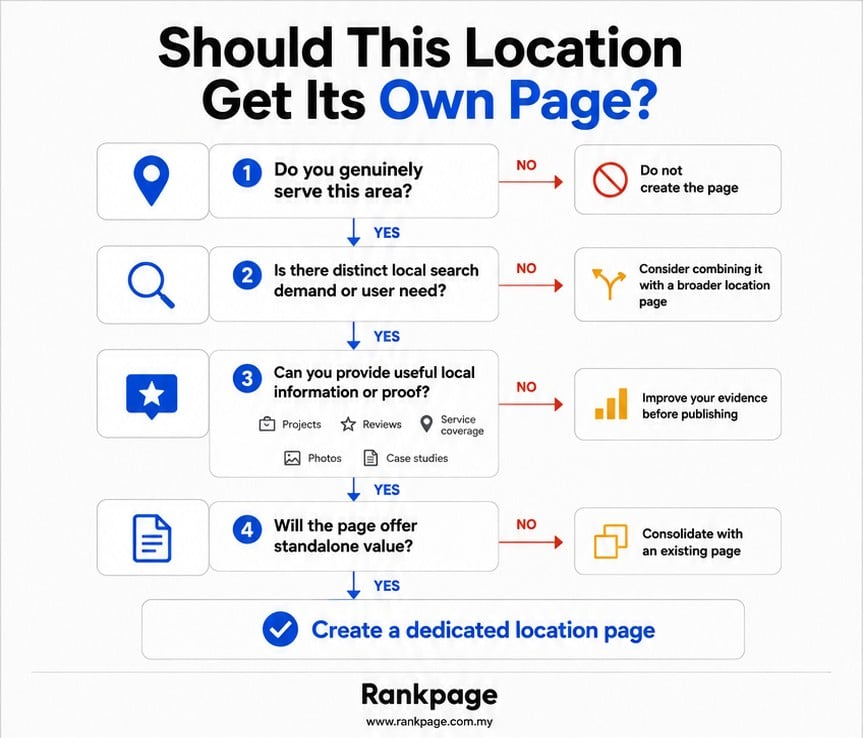
No. Creating more pages does not automatically create more rankings.
A location page may be justified when:
You genuinely serve the area: You already work with customers there or can accurately explain your coverage.
Distinct search demand exists: People search for your service together with that location.
Local proof is available: You can include projects, reviews, photographs or case studies.
User needs differ by location: Customers in the area may have different concerns, industries or service requirements.
For example, a commercial solar company serving factories in Penang may discuss industrial zones and manufacturing facilities that are less relevant elsewhere.
A separate page may not be necessary when:
- The content would be almost identical to another page.
- You cannot explain a meaningful connection to the area.
- The location overlaps heavily with an existing page.
- The page exists only to target another keyword variation.
| Situation | Recommendation |
|---|---|
| Genuine market with useful local information | Create a dedicated page |
| Similar intent to another location | Consolidate |
| No meaningful local information | Do not create the page |
| Existing thin page | Improve, merge or remove |
How Should Location Pages Be Internally Linked?
Useful location pages can still struggle when they are isolated.
Link From Service Pages
Relevant service pages should connect to priority locations.
Example:
Our SEO services are available across Malaysia, including Kuala Lumpur, Johor Bahru and Penang.
Create a Locations Hub
A locations page can help users navigate between genuine branches and service areas.
Link Back to Services
Location pages should link to their main service pages so users can explore the service in more detail.
Avoid Isolated Pages
Every important location page should:
- Be reachable through internal links
- Be accessible to users
- Link to relevant service and supporting pages
- Use a clear canonical URL
- Be included in the XML sitemap where appropriate
A sitemap can help search engines discover important URLs, but it does not replace internal navigation.
How Do You Avoid Keyword Cannibalisation?
Keyword cannibalisation commonly describes situations where several pages compete for substantially the same search intent.
| Search Intent | Recommended Page |
|---|---|
| SEO Services Malaysia | Main service page |
| SEO Services Kuala Lumpur | Kuala Lumpur page |
| SEO Services Selangor | Selangor page |
| Local SEO Guide | Blog article |
Each page should have a clear purpose.
When several pages target the same audience and intent, consider:
- Combining overlapping pages
- Redirecting weaker pages
- Clarifying each page’s purpose
- Improving internal links
- Updating titles and headings
The goal is not to prevent pages from sharing words. It is to ensure that each page serves a distinct purpose.
When Do Location Pages Become Doorway Pages?
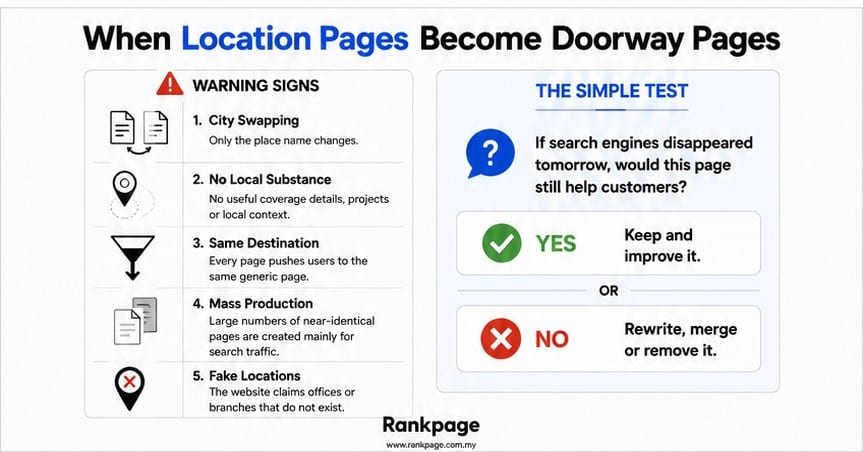
Google describes doorway abuse as creating pages to rank for similar searches when those pages act as less-useful intermediaries to the final destination.
Warning signs include:
City Swapping: Only the location name changes.
No Local Substance: The page contains no useful coverage information, projects or local context.
Same Destination: Many pages exist mainly to send users to the same generic page.
Mass Production: Large numbers of similar pages are generated mainly to gain search traffic.
Fake Locations: The website claims offices or branches that do not exist.
Ask:
If search engines disappeared tomorrow, would this page still be useful to customers?
When the answer is no, the page may need to be improved, merged or removed.
What Challenges Do Malaysian Businesses Face?
| Challenge | Recommended Approach |
|---|---|
| Overlapping geographic regions | Validate search intent before creating pages |
| Multiple language audiences | Localise content properly |
| Repetitive content risks | Add stronger local information |
| Large service areas | Focus on priority markets |
| Ongoing maintenance | Schedule regular reviews |
| Branch and service-area confusion | Describe locations accurately |
A business may serve the entire Klang Valley, but that does not mean it needs a separate page for every township.
In many cases, a smaller set of useful, well-supported pages is safer than dozens of thin or repetitive pages.
How Much Does It Cost to Build Location Pages?
Costs vary depending on:
- Research
- Content creation
- Design
- Photography
- Development
- Technical SEO
- Ongoing updates
Businesses generally have three options:
DIY: Lower direct cost, but requires time and knowledge.
In-house team: Greater control, but requires ongoing resources.
Agency support: Higher investment, but may include strategy, content, implementation and quality control.
Publishing many low-quality pages can create additional costs later if they need to be rewritten, merged or removed.
How Can You Create Location Pages Step by Step?
- Audit existing location pages.
- Identify genuine branches and service areas.
- Review search demand and user intent.
- Decide which locations justify dedicated pages.
- Build a reusable page template.
- Collect local reviews, photographs and project evidence.
- Write useful local content.
- Optimise titles, headings, URLs and metadata.
- Add relevant internal links.
- Publish and monitor performance.
- Improve, merge or remove pages based on reliable data.
This approach is more sustainable than publishing dozens of pages without enough local information.
Getting Location Pages Right
Location pages that support long-term SEO are built around local value, not simple keyword variations.
The strongest pages explain how a business serves a specific area, provide credible evidence and give users a clear next step.
For Malaysian businesses, the most effective approach is usually to create a smaller number of accurate, useful and maintainable pages rather than a large collection of repetitive ones.
Rankpage SEO Agency can help businesses develop location-page strategies that support sustainable local SEO growth while reducing risks such as thin content, overlapping search intent and doorway-style pages.
Sources
- Google Search Central: Spam Policies for Google Web Search
- Google Search Central: Creating Helpful, Reliable, People-First Content
- Google Search Central: SEO Starter Guide
- Google Search Central: Title Link Best Practices
- Google Search Central: Image SEO Best Practices
- Google Search Central: Link and Sitemap Guidance
- Google Business Profile Help: Address and Service-Area Guidance
Frequently Asked Questions About How to Create Location Pages That Actually Rank
What Is a Location Page in SEO?
A location page is a webpage created for a specific geographic area. It provides information relevant to users in that location and may help search engines understand where a business operates or provides services.
Do I Need a Physical Office to Create a Location Page?
No. A business may create an accurate service-area page for a location it genuinely serves.
However, the page must not suggest that a branch exists when it does not. Google Business Profiles have separate eligibility, address and service-area rules.
How Many Location Pages Should My Business Have?
There is no ideal number.
Focus on locations where you have genuine coverage, useful local information and a clear reason for creating a dedicated page.
Can I Use the Same Template for Every Location?
Yes, a shared layout is generally acceptable.
However, each page should contain enough useful and accurate information to serve its intended audience. Avoid pages that merely replace one city name with another.
Are Service-Area Pages Considered Doorway Pages?
Not automatically.
They may become problematic when they contain little standalone value and exist mainly to target similar keyword variations.
How Long Does It Take for Location Pages to Rank?
There is no guaranteed timeline.
Results may depend on competition, website quality, content usefulness, internal linking, technical accessibility and relevance to the search.