What Does “Crawled but Not Indexed” Actually Mean?
Google has discovered and accessed the page, but it has not added it to the search index.
When Googlebot crawls a page, it fetches the content, analyses it for signals, and determines whether it should be added to the searchable index. If it chooses not to index the page, the content will not be eligible to rank even if it is technically accessible.
This usually indicates:
- Google does not see enough value in the page yet
- A technical issue is affecting visibility
- The page duplicates content found elsewhere
- Google prefers other URLs from the same domain
This status is common for new websites or content created rapidly without adequate internal context or backlink signals.
Read more: Top 10 SEO Backlink in 2025: What Malaysian Businesses Need to Know
8 Reasons Why Does Google Crawl a Page but Decide Not to Index It
Indexing is selective, and Google priorities content that meets quality, uniqueness, and usefulness criteria.
Here are the most common reasons:
1. Thin or Low-value Content
Google avoids indexing pages with limited substance, for example:
- Very short articles
- Content with little original insight
- Pages created only for SEO
- Auto-generated or repetitive content
If Google believes the page provides little benefit to users, it may choose not to index it.
2. Duplicate or Near-duplicate Content
Google rarely indexes multiple versions of the same content. This can happen if:
- The same topic is covered repeatedly with minimal differentiation
- Pagination and filter pages mirror content
- Product pages have identical descriptions
- Multiple blog posts target identical keywords
Duplicate content does not violate guidelines, but Google simply prefers unique pages.
3. Weak Internal Linking Signals
When a page has few or no internal links pointing to it, Google may treat it as low priority.
Pages buried deep in the site structure or orphaned (no links at all) often remain unindexed.
4. Crawl Budget and Site Quality Signals
Websites with:
- Many low-quality URLs
- Repeated soft-404 content
- Poor site structure
- Slow page performance
…may have parts of their content intentionally deprioritised.
Google allocates crawling resources based on trust and historical value.
Learn more about Core Web Vitals That Matter for Your Website.
5. Canonicalisation Conflicts
If a page declares another URL as canonical, Google may decide: “Index the preferred URL instead.”
This happens when:
- Incorrect canonical tags point elsewhere
- Dynamic parameters confuse URL versions
- Duplicate pages declare conflicting canonicals
6. Noindex Tags (Intentional or Accidental)
Sometimes teams unintentionally leave “noindex” tags on newly created pages and forget to disable it. Even after removing the tag, indexing may take time to resume.
7. Rendering or JavaScript issues
If Googlebot cannot access certain content due to JavaScript blocking or client-side rendering delays, it may crawl the URL but choose not to index it.
8. Pages Not Meeting Helpful Content Expectations
Google’s quality systems evaluate user benefit. Pages created purely for keywords, without genuine usefulness, often remain unindexed.
How Can You Diagnose “Crawled but Not Indexed” in Google Search Console?
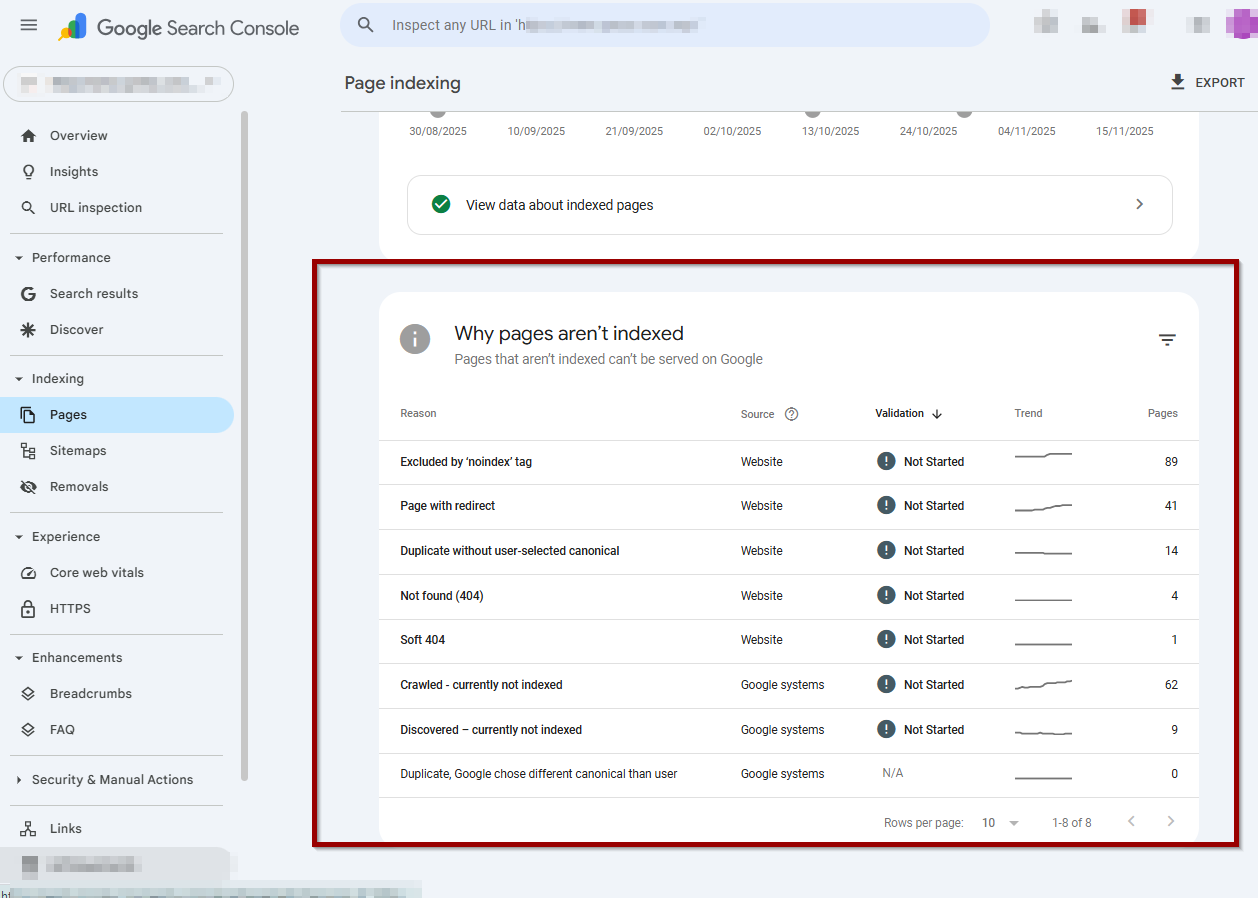
The Page Indexing report provides details about the indexing status and potential causes.
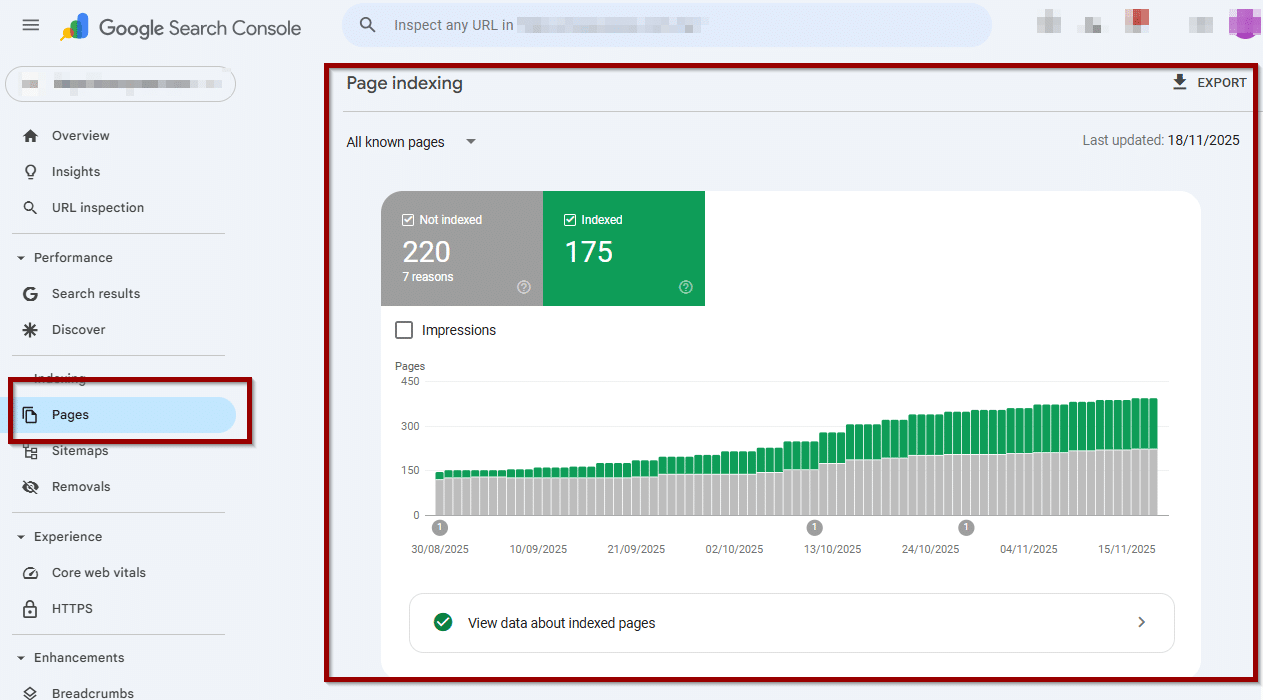
Steps to inspect your page:
- Open URL Inspection in GSC.
- Enter the URL.
- Check “Coverage” → “Page indexing.”
- Review Google’s reasoning:
- Crawled – currently not indexed
- Discovered – currently not indexed
- Alternate page with canonical tag
- Duplicate without user-selected canonical
Tools to validate issues:
- Inspect rendered HTML
- Test internal linking depth
- Check canonical declarations
- Review sitemap inclusion
- Analyse overall site health
These signals help determine whether the issue is content quality, technical configuration, or both.
How Do You Fix a Page That is Crawled but Not Indexed?
A structured improvement process increases the likelihood of indexing.
Below are the most effective actions.
1. Strengthen the content usefulness
Rewrite or expand content to:
- Provide original insights
- Add clear explanations or examples
- Include data, comparisons, or structured information
- Address actual user questions
- Improve clarity and depth
Pages with strong informational value tend to be indexed faster.
2. Improve internal linking
Ensure the page receives links from:
- Main navigation (if appropriate)
- Related articles
- Category pages
- High-traffic pages
Internal links pass context and priority signals.
3. Remove thin or duplicate URLs
Conduct a site clean-up:
- Consolidate overlapping pages
- Redirect outdated or redundant content
- Delete thin content and return 410/404
- Use canonical tags appropriately
Reducing noise improves site-wide indexing efficiency.
4. Fix technical barriers
Common fixes include:
- Remove accidental noindex tags
- Correct canonical mismatches
- Resolve redirect chains
- Ensure correct sitemap entries
- Improve page speed and render blocking issues
If Google can access and understand your page better, indexing improves.
5. Strengthen authority and context
Google may hesitate to index pages from new or low-authority domains.
Support your content with:
- High-quality backlinks
- Mentions or citations
- Rich internal linking
- Structured data (FAQ schema, Article schema)
Authority influences crawl frequency and indexing priority.
6. Request indexing the right way
You can request indexing via:
- URL Inspection → “Request Indexing”
- Re-submitting sitemaps
- Updating internal links
Manual requests do not guarantee indexing, but they can speed up evaluation.
How Long Does It Take for Google to Index a Page After It Has Been Crawled?
Indexing time varies from a few hours to several weeks depending on site quality, domain age, content depth, and crawl frequency.
New websites or low-authority sites often experience slower indexing cycles. High-authority sites are crawled and updated much more frequently.
Does “Crawled but Not Indexed” Hurt Seo?
It does not harm your overall SEO, but it reduces your content footprint in search results.
If a large portion of your website remains unindexed:
- Your topical authority weakens
- Organic visibility drops
- Pages receive little or no search traffic
- New content struggles to rank
Addressing indexing issues is essential for long-term SEO health.
How Do You Prevent Future Indexing Issues?
Preventing future indexing issues requires ongoing attention to website hygiene and content quality. When pages are well-organised, technically accessible, and built around clear user value, Google is more likely to evaluate them positively and index them without delays.
Prevention checklist:
- Publish substantial, user-focused content
- Avoid overlapping topics
- Use clear internal linking structures
- Ensure sitemap accuracy
- Maintain a clean URL structure
- Remove duplicate or irrelevant pages
- Optimise page performance
- Use structured data where relevant
Consistent quality builds trust with Google’s systems.
Summary Table: Common Causes and Fixes
Issue | Why It Happens | How to Fix |
Thin content | Low value or minimal insights | Expand, add data, improve usefulness |
Duplicate content | Similar or repeated pages | Consolidate, use canonical tags |
Weak internal links | No signals of importance | Link from relevant pages |
Canonical conflicts | Google sees another URL as preferred | Correct canonical declarations |
Technical barriers | Noindex, redirects, rendering issues | Clean up technical configuration |
Low authority | Untrusted or new domain | Build links, improve signals |
Crawl budget issues | Too many low-quality URLs | Remove thin pages, improve structure |
Conclusion: How to Improve Indexing and Seo Performance
Indexing issues are often a sign that Google needs stronger signals about your website’s quality, relevance, and structure. Solving “crawled but not indexed” requires a mix of content improvement, technical fixes, internal linking, and authority building.
This is exactly where Rankpage supports businesses.
Rankpage’s SEO services in Malaysia focus on:
- Improving content quality and relevance
- Strengthening site structure and internal linking
- Fixing technical barriers that block indexing
- Ensuring clean sitemaps, correct canonicals, and healthy URL signals
- Enhancing topical authority with strategic content planning
- Conducting regular site audits for crawl and indexing issues
For SMEs in Malaysia, these improvements translate into more reliable indexing, stronger search visibility, and sustainable long-term growth. If indexing challenges have been holding your website back, we provide the technical expertise and strategic guidance to resolve them and improve your organic performance.