How to Measure Google Ads ROI (Step-by-step Dashboard Setup)

Home > SEO > How to Measure Google Ads ROI (Step-by-step Dashboard Setup)
Two professionals working together on analytics with Google Ads charts in the background and a Rankpage article banner overlay.

Key Takeaways

  • Google Ads ROI is calculated using the formula: (Revenue – Cost) / Cost.
  • Accurate ROI tracking starts with linking Google Ads and Google Analytics (GA4).
  • Conversion tracking setup is essential for measuring cost per acquisition (CPA).
  • Custom dashboards in Looker Studio (formerly Data Studio) offer real-time ROI monitoring.
  • Segmentation by campaign, device, and location reveals performance trends and optimization opportunities.

Running Google Ads without tracking ROI is like throwing money into a vending machine and hoping for an iPhone. Whether you’re burning RM500 or RM50,000 a month, knowing what each ringgit brings back is the only way to scale without sweating.

In this guide, our Malaysia SEO expert shows you exactly how to measure Google Ads ROI, set up proper tracking, and build a dashboard using Looker Studio complete with examples that make sense for Malaysian businesses and SMEs.

Table of Contents

What Is Google Ads ROI?

Return on Investment (ROI) in Google Ads tells you how much revenue you’re making compared to what you’re spending.

Formula: 

“ROI = (Revenue – Cost) / Cost”

For example, if you spend RM2,000 and earn RM8,000, your ROI is (8000 – 2000) / 2000 = 3 times or 300%.

Step 1: Link Google Ads to GA4

Why: GA4 offers deeper insights into user behavior, lifetime value, and multi-touch attribution.

How:

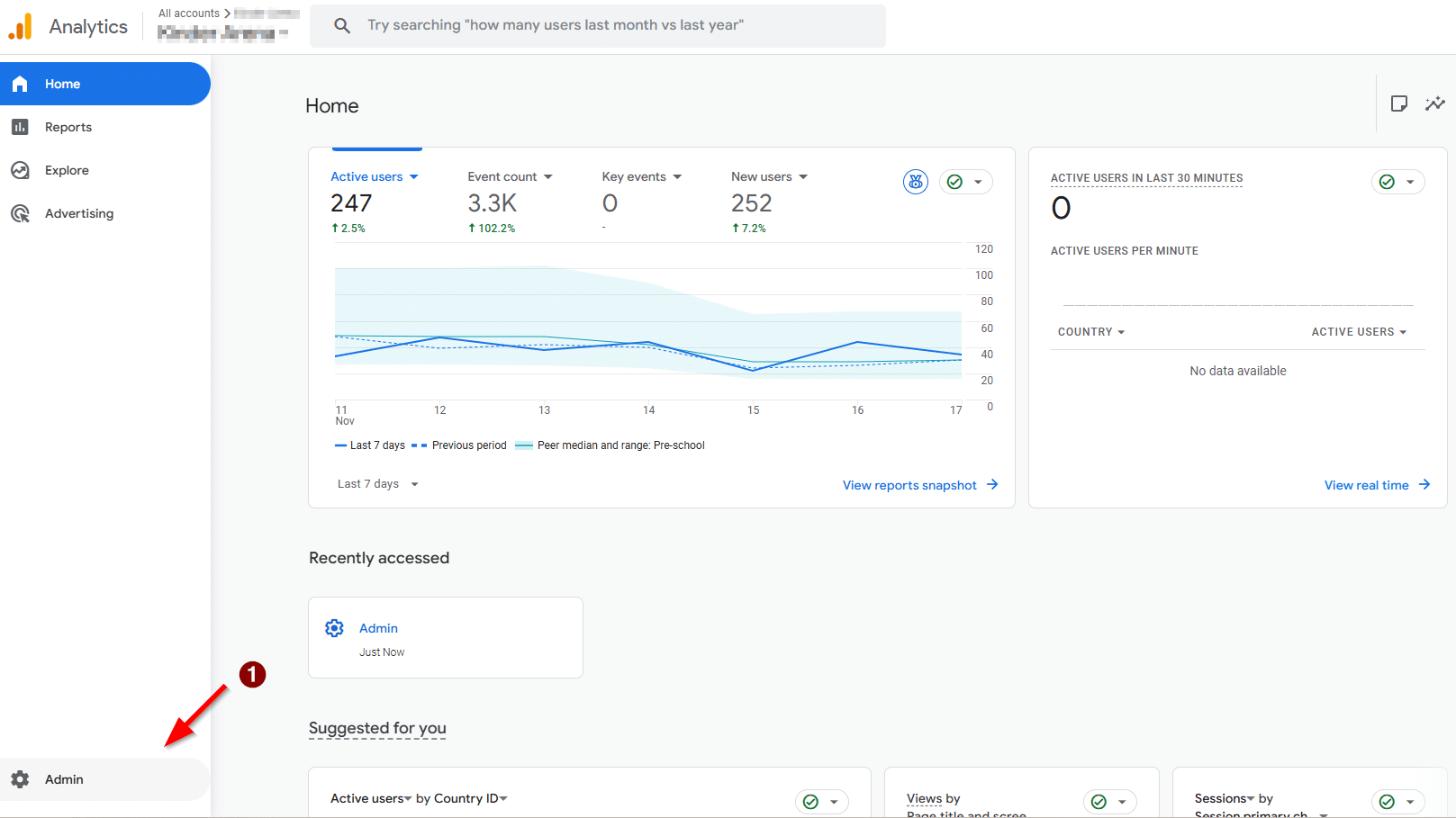
  1. Go to Admin in GA4.
    Google Analytics 4 dashboard showing user metrics with red arrow pointing to the Admin settings button.
  2. Under “Product Links,” choose “Google Ads.”
  3. Connect your account and enable auto-tagging.
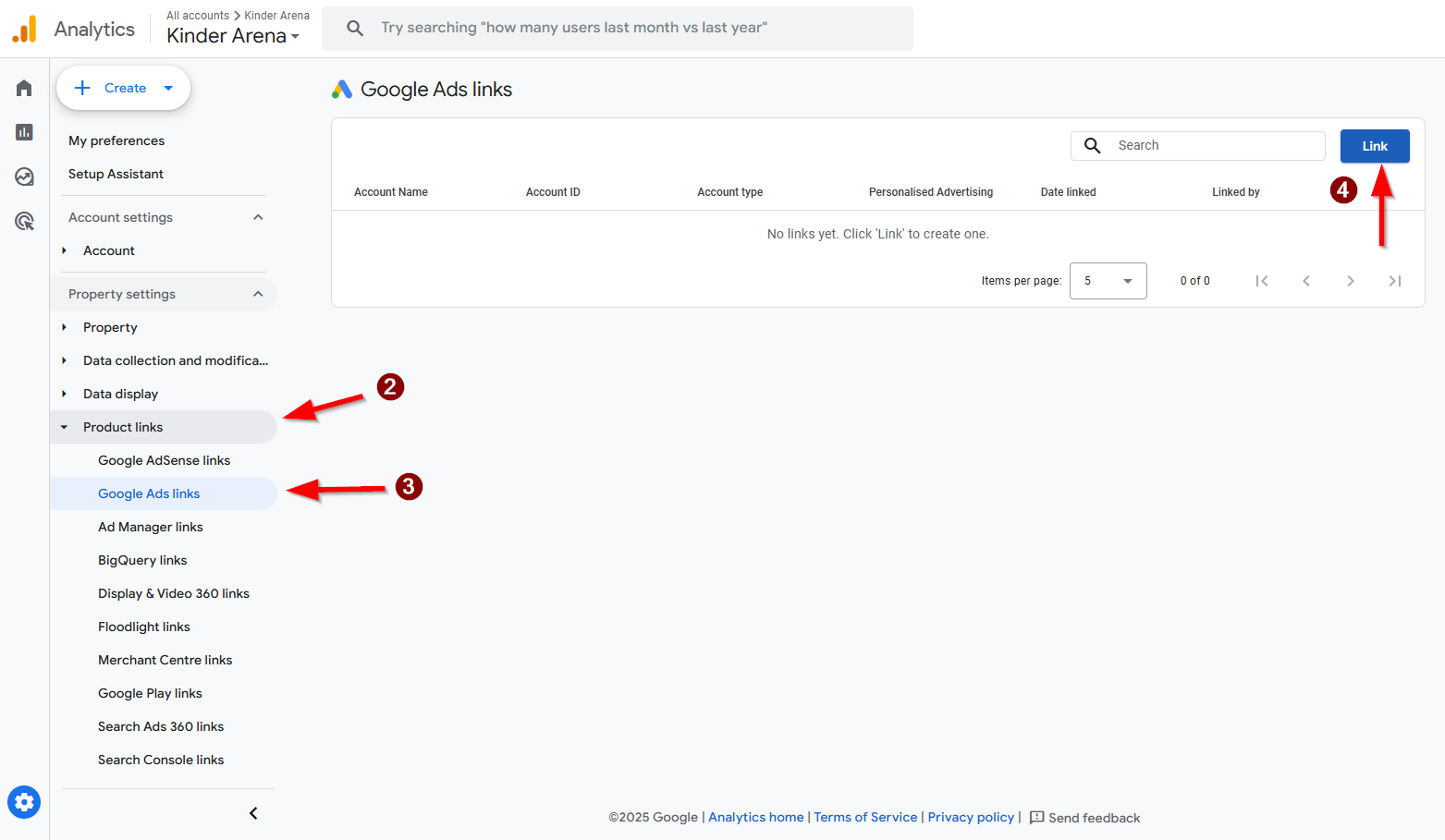
    Google Analytics 4 interface showing steps to link a Google Ads account, with arrows pointing to "Product links," "Google Ads links," and "Link" button.

Ensure conversions in GA4 are being imported into Google Ads for accurate attribution.

Step 2: Set Up Conversion Tracking

Why: Conversion data allows you to measure cost per lead, sale, or action.

How:

  1. In Google Ads, go to Tools > Conversions.
  2. Create a new conversion action (like., form submissions, purchases).
  3. Install the tag on your website using Google Tag Manager or directly.
  4. Test using Google Tag Assistant to confirm that the tag is firing correctly.

This ensures every ringgit spent can be traced to measurable outcomes.
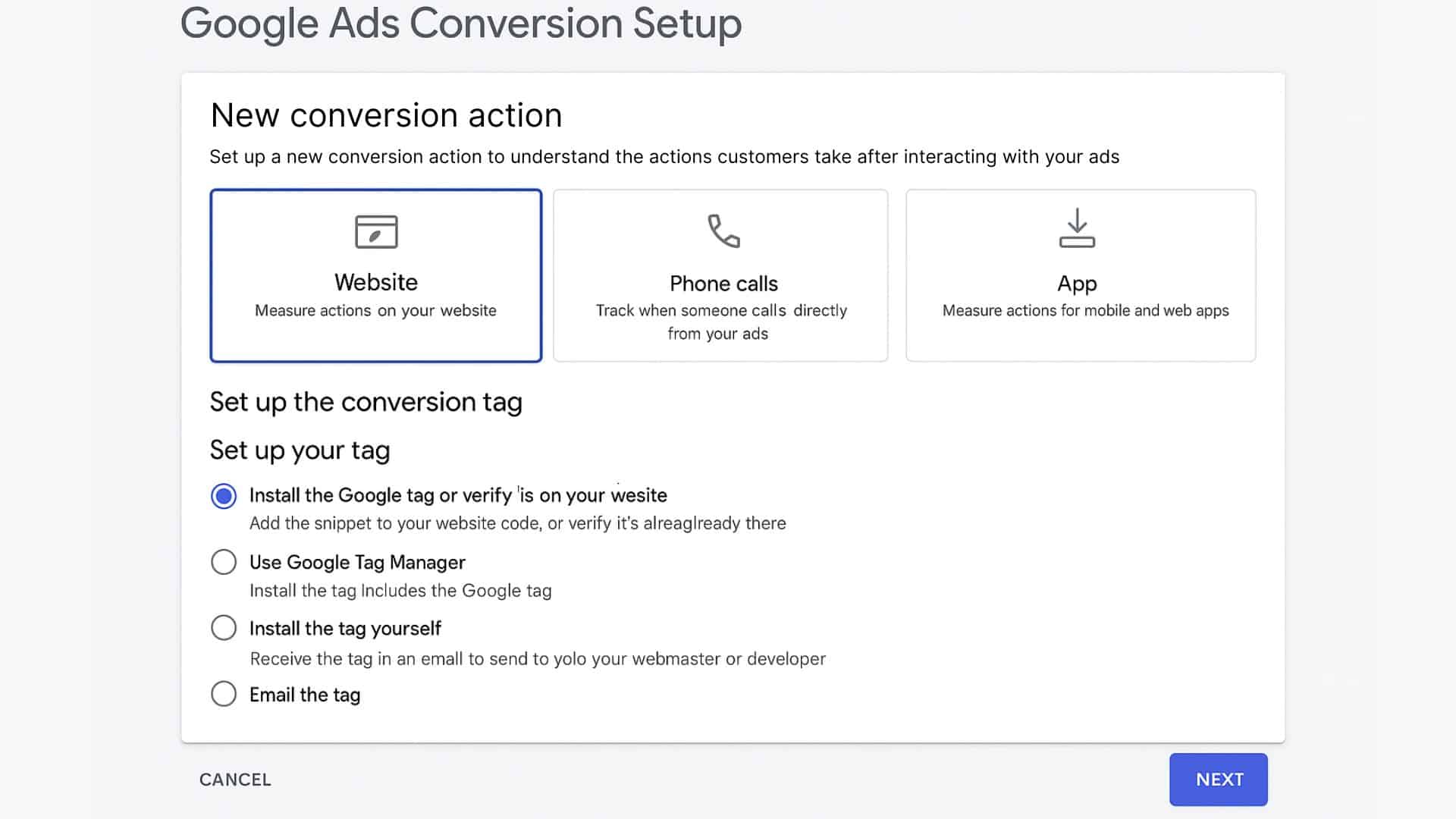
Google Ads interface displaying conversion setup options for Website, Phone calls, and App, with tag installation methods listed below.

Step 3: Define What Counts as Revenue

Why: ROI is only meaningful if revenue is clearly defined.

Options:

  • For eCommerce: Use actual transaction values from your checkout page.
  • For lead generation: Assign values based on your average lead-to-sale conversion rate.

Example:
If 10 leads yield 2 sales worth RM2,000 total, then each lead is worth RM200.
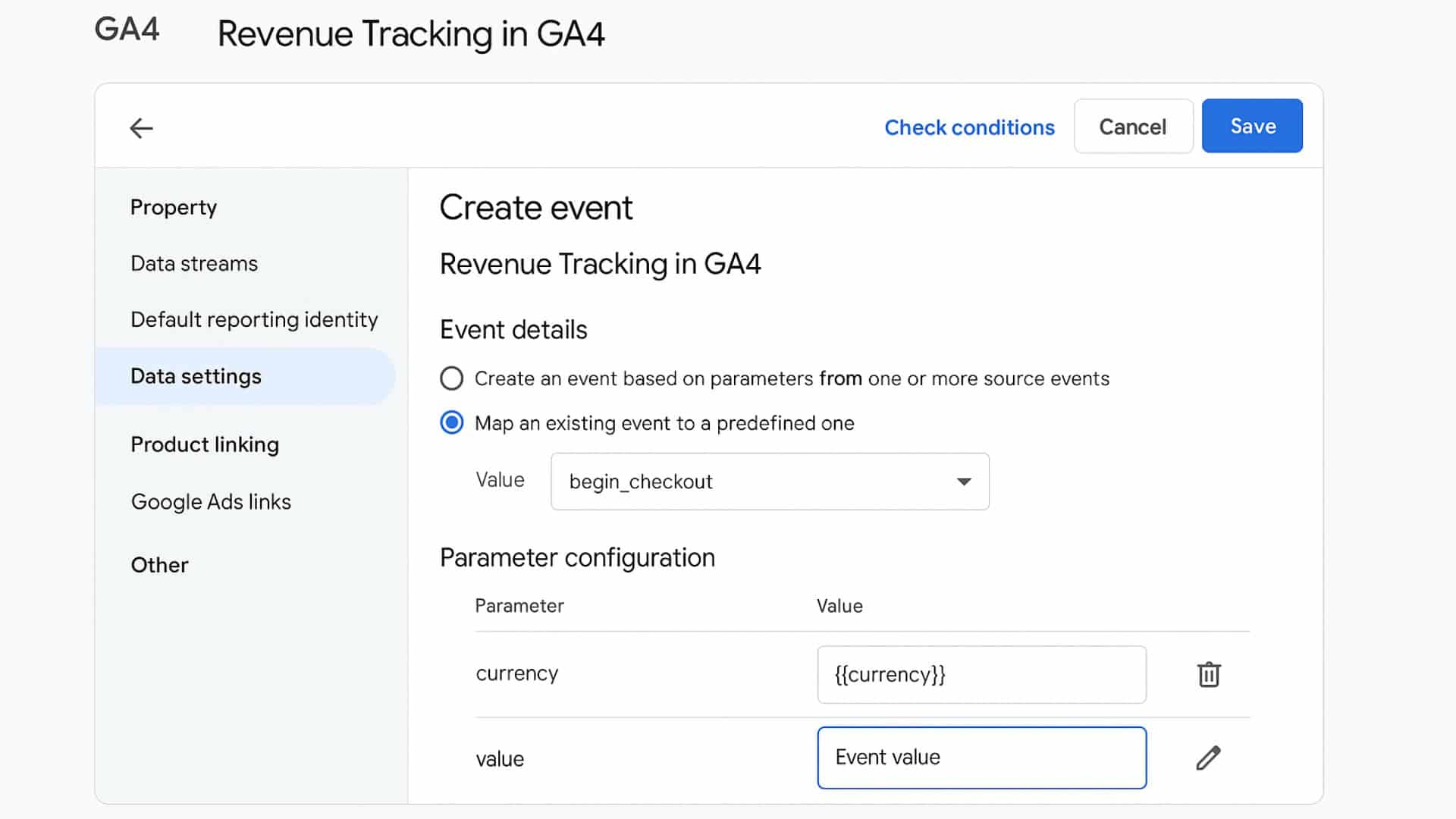
Revenue Tacking in GA4 GA4 interface showing revenue tracking setup with mapped event “begin_checkout” and parameter configurations for currency and value.

Step 4: Build a Google Ads ROI Dashboard in Looker Studio

Why: Dashboards help you monitor campaign performance in real time and quickly identify underperforming segments.

Steps:

  1. Log in to Looker Studio and click “Create.”
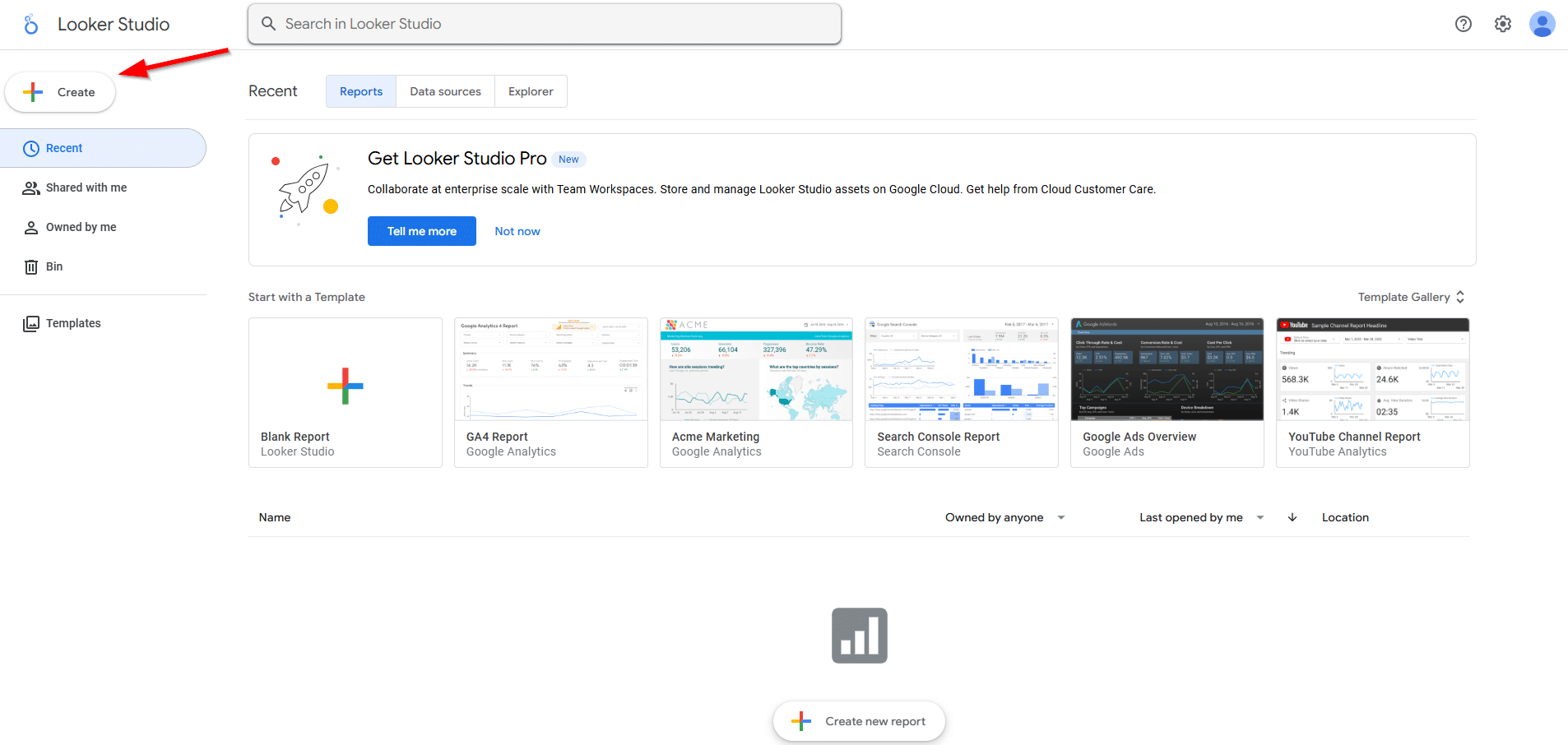
    Looker Studio dashboard home screen with arrow pointing to the “Create” button for starting a new report.
  1. Choose Google Ads and GA4 as your data sources.
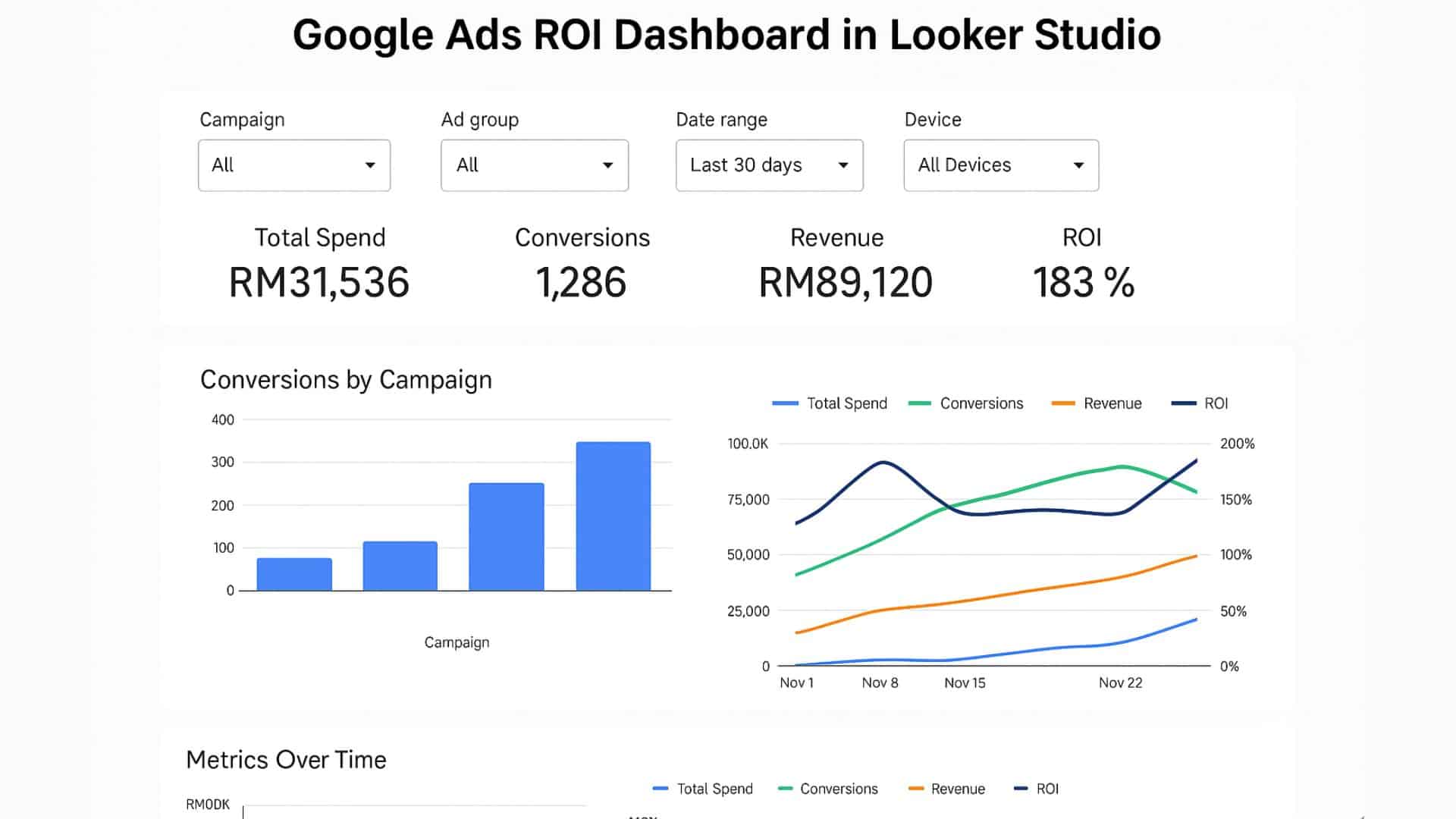
  2. Build scorecards for:
    • Total Ad Spend
    • Number of Conversions
    • Total Revenue
    • ROI (create a calculated field)

      Google Ads ROI dashboard in Looker Studio displaying total spend, conversions, revenue, ROI, and campaign performance charts.

  1. Add filters and segments such as campaign, device type, or geographic location.
  2. Use bar charts and time series graphs to visualise trends.

Step 5: Segment and Optimise Your Campaigns

Why: Not all campaigns deliver the same return.

Use filters to drill into performance:

  • Campaign Name or ID
  • Top-performing Keywords
  • Devices (Mobile vs Desktop)
  • Location (state or city in Malaysia)

Pause or adjust underperforming campaigns. Reallocate budget to those showing higher ROI.

Further reading: Top 10 Google Ads Mistakes Malaysian Businesses Make
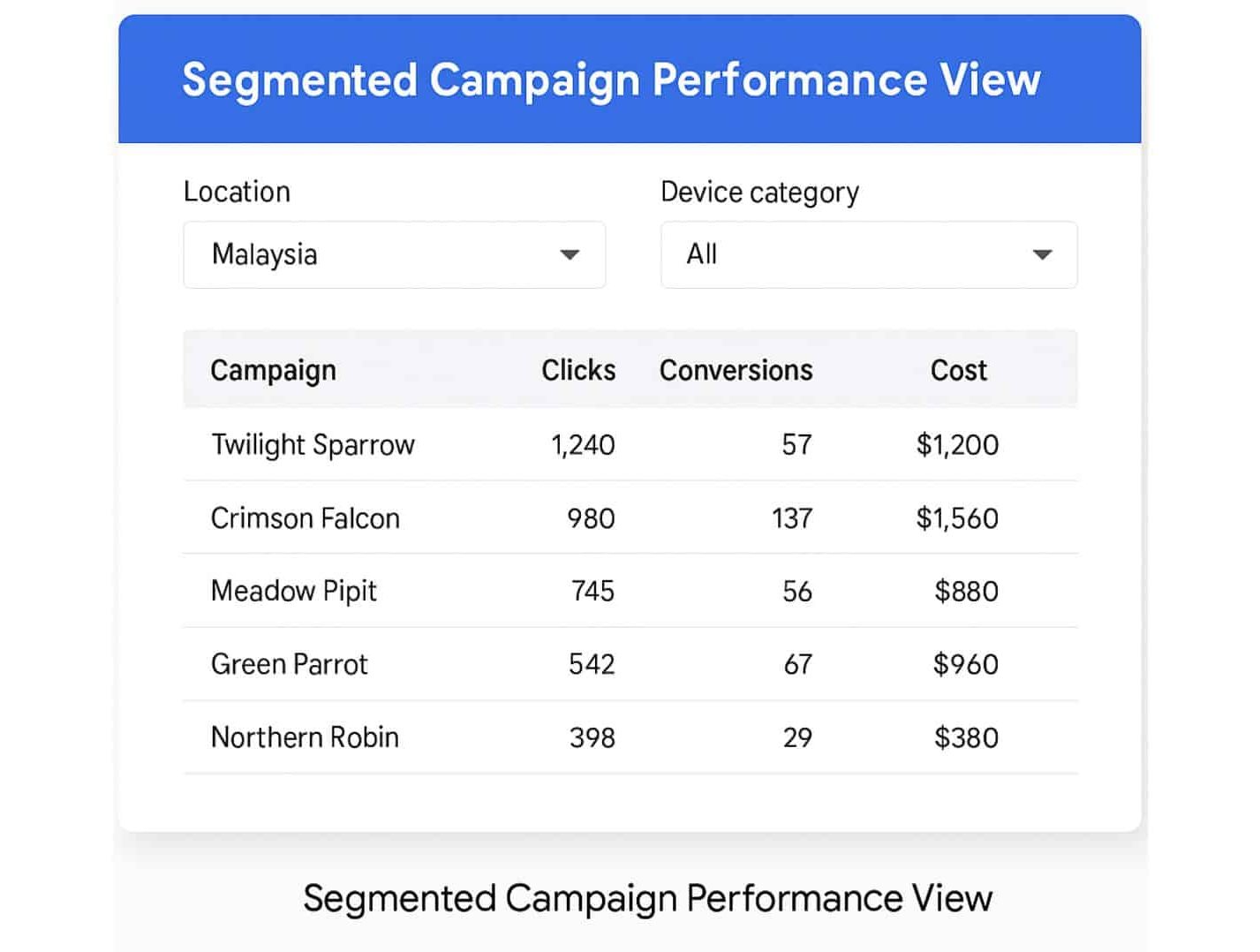
Segmented campaign performance table showing clicks, conversions, and cost by campaign in Malaysia, filtered by device category.

Conclusion: Google Ads ROI is a Strategy, Not Just a Metric

The goal isn’t just tracking ROI, but using it to guide campaign decisions. With accurate conversion tracking, clear revenue attribution, and a real-time dashboard, Malaysian businesses can scale Google Ads campaigns confidently and sustainably.

Need help setting this up with Google Ads ROI tracking? Our team can build a custom ROI dashboard based on your KPIs, industry goals, and reporting needs.

Need Help Tracking Google Ads ROI?

If you’re a Malaysian business owner aiming to maximise returns from your ad spend, our PPC and SEO experts can help. We’ll audit your current setup, resolve tracking issues, and build a customised ROI dashboard aligned with your KPIs, business goals, and reporting requirements. Whether you’re just getting started or scaling your ad campaigns effectively, having the right insights in place makes all the difference. Let us simplify your performance tracking so you can focus on growing your business.


Frequently Asked Questions About How to Measure Google Ads ROI

What is ROI in Google Ads?

ROI (Return on Investment) in Google Ads measures how much revenue you earn for every ringgit spent. It’s calculated as: (Revenue – Cost) / Cost.

How do I track Google Ads ROI in GA4?

Link GA4 with your Google Ads account, enable conversion tracking, assign values to goals, and use Looker Studio to visualise ROI metrics.

What should my Google Ads ROI dashboard include?

A proper dashboard should show ad spend, conversions, revenue, CPA, ROAS, and campaign segmentation by device, location, or keyword.

Can I track Google Ads ROI without eCommerce data?

Yes. You can assign estimated values to leads (e.g. RM200 per lead) and still calculate ROI using goal completions and conversion values.

What tools are best for Google Ads ROI reporting?

Use GA4 for tracking and Looker Studio (formerly Data Studio) to build visual ROI dashboards. Google Ads conversion tracking is also essential.

Why is my Google Ads ROI low?

Low ROI can result from poor ad targeting, weak landing pages, or unoptimised bidding. A proper audit and dashboard help identify the issues.

Drop Us Message


    This article was written and reviewed by the Rankpage SEO Team in line with our Editorial Policy.

    Like this post? Share it!

    Facebook
    Threads
    WhatsApp
    Email
    LinkedIn
    Twitter