For many Malaysian businesses, WhatsApp is where sales conversations begin. Customers ask about price, location, stock, appointments, delivery, packages and promos before they ever fill in a lead form.
But getting WhatsApp messages is not the same as generating qualified leads. A short “price?” message, a serious quotation request and a ready-to-book customer should not be treated the same way.
In 2026, businesses need a simple system for turning WhatsApp enquiries into proper sales opportunities: capture the enquiry, ask the right questions, identify intent, follow up and track which chats become customers.
What Are WhatsApp Leads?
WhatsApp leads are potential customers who contact your business through WhatsApp and show interest in your product, service, quotation, appointment or consultation.
They may come from your website, Google Business Profile, Facebook ads, Instagram bio, TikTok profile, QR code, referral, event booth or printed brochure.
However, not every WhatsApp enquiry is a qualified lead. Some users are casually comparing prices, while others are ready to book. The goal is to identify who has real need, reasonable fit, buying intent and next-step readiness.
Read More: Local SEO For Malaysian Beginners: A Step By Step Guide
| Lead Type | Meaning | Example |
|---|---|---|
| Cold lead | Interested but not ready | “Just checking price.” |
| Warm lead | Has some buying intent | “Can you send package details?” |
| Hot lead | Ready for next step | “Can I book an appointment tomorrow?” |
Why WhatsApp Works So Well For Malaysian Businesses
WhatsApp works well in Malaysia because it fits how local customers already communicate: fast, direct, mobile-first and conversational.
Many customers do not want to wait for email replies or fill in long forms. They want quick answers before deciding whether to visit, book, buy or compare another provider.
This is especially useful for businesses where customers need reassurance before buying, such as clinics, renovation firms, tuition centres, car workshops, property agents, event companies, beauty salons, catering services and B2B suppliers.
WhatsApp supports common sales conversations such as:
- Price and package enquiries
- Location and delivery questions
- Appointment requests
- Promo checks
- Product availability
- Quotation requests
- Follow-up reminders
For many SMEs, WhatsApp is not just a support channel. It is often the first serious sales conversation.
Where Do WhatsApp Leads Come From?
The best WhatsApp lead systems capture enquiries from multiple touchpoints, not just one floating website button.
| Lead Source | How To Use WhatsApp |
|---|---|
| Website | Add WhatsApp CTA on service and product pages |
| SEO blog posts | Place WhatsApp CTA after helpful sections |
| Google Business Profile | Encourage direct enquiry for local services |
| Facebook and Instagram ads | Use click-to-WhatsApp campaigns |
| TikTok and Instagram bio | Add WhatsApp link or link-in-bio CTA |
| Retail store | Use QR codes at counters, shelves or receipts |
| Events and expos | Add QR codes to booth signage and flyers |
| Email signature | Add WhatsApp link for faster B2B follow-up |
Instead of vague CTAs like “Chat with us,” make the action clear. Use phrases such as “Get a quotation on WhatsApp,” “Check package availability,” “Book a consultation,” or “Send us your requirements.”
How To Turn WhatsApp Enquiries Into Qualified Leads
Step 1: Set Up Your Profile And First Replies
Before driving traffic to WhatsApp, make sure your profile looks trustworthy.
Your WhatsApp Business profile should include:
- Business name
- Logo
- Business category
- Website
- Address or service area
- Opening hours
- Short business description
- Product or service catalogue
- Greeting message
- Away message
- Quick replies
A weak profile says:
“We sell cabinets.”
A better profile says:
“Custom kitchen cabinet and built-in wardrobe specialist serving KL and Selangor. WhatsApp us for design consultation, quotation and appointment booking.”
Your first reply should guide the customer forward. A weak reply says, “Yes, available.” A better reply says:
“Hi, thanks for contacting us. Yes, this is available. May I know your location and when you need it, so I can check the best option for you?”
| Customer Message | Better Reply Angle |
|---|---|
| “Price?” | Give a starting range, then ask for location or requirement |
| “Got promo?” | Confirm promo, then ask which product or package they want |
| “Where are you?” | Share location, then ask whether they want visit, delivery or service |
| “Can book today?” | Ask preferred branch, time and service type |
| “Still available?” | Confirm availability, then ask about delivery, pickup or details |
Step 2: Handle “PM Price” Without Losing The Lead
Malaysian customers often start with price. That does not mean they are bad leads. It usually means they are checking whether your offer fits their budget.
The mistake is giving only a number and stopping there.
Instead, give helpful pricing context while continuing the conversation.
Example:
“Our packages usually start from RM1,200, but the final price depends on your location, size and requirements. May I ask what area you are in and what type of service you need?”
For variable-price services, a range works better than hiding the price completely.
Example:
“For basic packages, the range is usually RM800 to RM1,500. For customised work, it depends on the size and scope. If you send us a few details, we can recommend the most suitable option.”
This is useful for renovation, clinics, tuition, events, B2B supply, car repair, website design, digital marketing and other service-based businesses.
Step 3: Ask 2 To 4 Qualifying Questions
A WhatsApp enquiry becomes more valuable when you know the customer’s need, budget, location and urgency.
Do not ask too many questions at once. Start with 2 to 4 important questions.
| Business Type | Useful Qualifying Questions |
|---|---|
| Renovation | Property type, location, budget, timeline |
| Clinic | Concern, preferred branch, appointment date |
| Tuition centre | Student level, subject, online or physical class |
| Property | Budget, location preference, own stay or investment |
| Insurance | Coverage type, age range, monthly budget |
| B2B supplier | Product type, quantity, delivery location, timeline |
| Catering | Event date, pax count, location, budget |
| Car workshop | Car model, issue, location, urgency |
A simple script:
“Thanks, I can help with that. May I ask 3 quick questions so I can recommend the right option?”
Step 4: Label And Prioritise Leads
If you use the WhatsApp Business App, labels can help you stay organised. If you have a bigger team, use a shared inbox or CRM.
Suggested labels:
- New enquiry
- Hot lead
- Warm lead
- Cold lead
- Quotation sent
- Appointment booked
- Follow-up needed
- Paid customer
- No response
This helps your team prioritise serious buyers instead of treating every chat the same.
Step 5: Build Trust Inside The Chat
Many WhatsApp leads do not convert because they still feel unsure (“Can trust ah?”).
Useful trust assets include:
- Google review link
- Customer testimonials
- Before-and-after photos
- Case studies
- Product catalogue
- Price range
- Warranty details
- SSM details where relevant
- Location or branch proof
- Payment and delivery process
For example, a renovation company can send past project photos, material options and warranty details. A clinic can share branch details, consultation process and general treatment information. A B2B supplier can send product specifications, MOQ range and estimated delivery timeline.
Step 6: Follow Up Without Spamming
Use this simple follow-up timeline to keep warm leads from going cold.
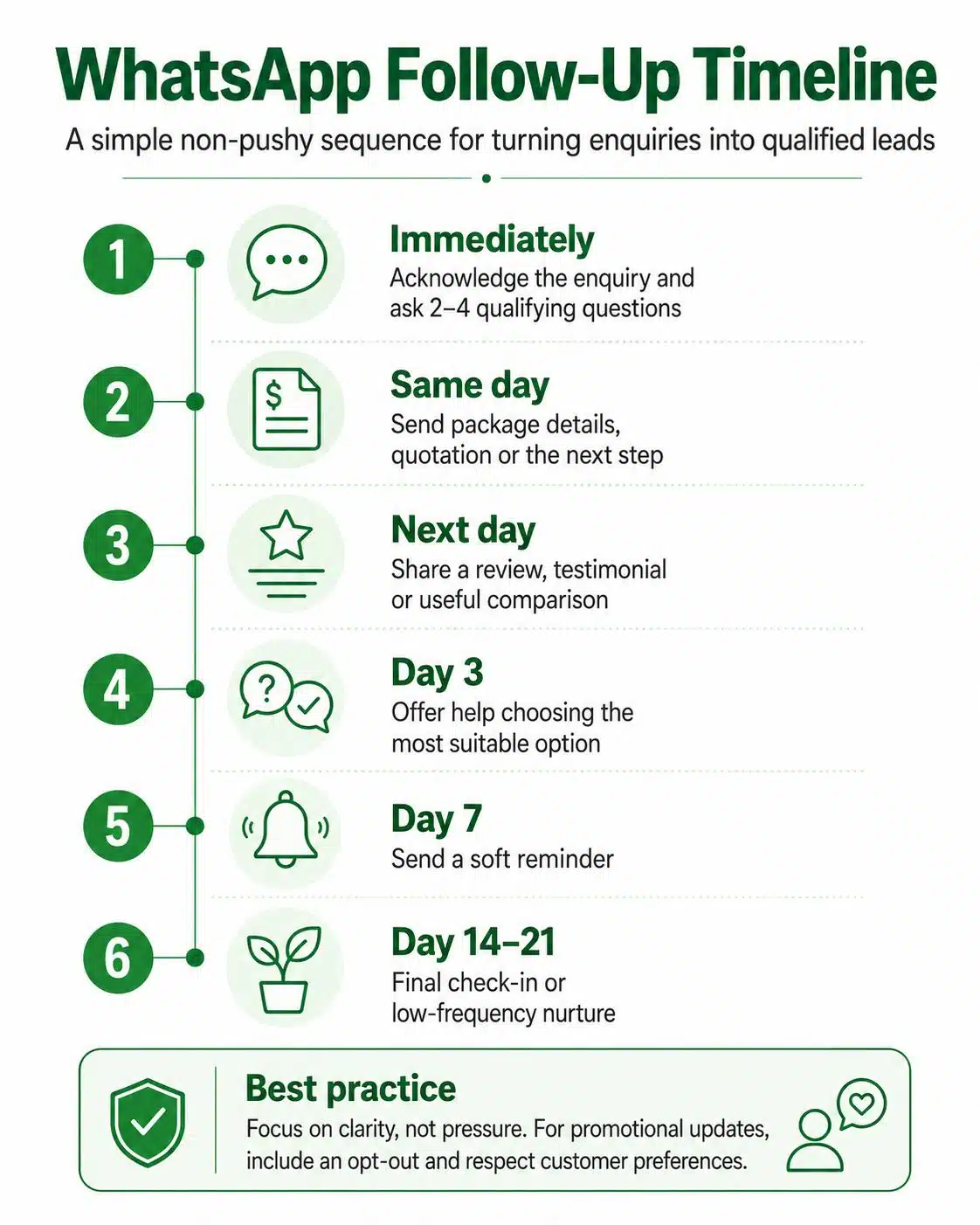
Many businesses lose leads because they send one quotation and stop.
| Timing | Message Purpose |
|---|---|
| Immediately | Acknowledge enquiry and ask qualifying questions |
| Same day | Send package, catalogue, quotation or next step |
| Next day | Share review, testimonial or useful comparison |
| Day 3 | Ask if they need help choosing the right option |
| Day 7 | Send a soft reminder |
| Day 14 or 21 | Final check-in or low-frequency nurture |
Example:
“Hi, just checking if you had a chance to review the quotation. I can also help compare the options if you are still deciding.”
Good follow-up should provide clarity, not pressure.
Common WhatsApp Lead Generation Challenges
- Slow replies can cost sales. Customers often message several providers at once, so use quick replies, greeting messages and clear staff responsibilities.
- Too many price-only enquiries may signal weak pre-qualification. Add starting prices, package ranges or clearer details on your website and ads.
- No sales script creates inconsistent replies. Prepare standard responses for price, promo, location, appointment, quotation and follow-up enquiries.
- Weak follow-up causes warm leads to go cold. Instead of asking “still interested?”, send useful reminders, comparisons, reviews or next-step guidance.
- No consent process can create marketing risk. Avoid blasting promotional WhatsApp messages to cold numbers. WhatsApp’s business messaging rules generally expect that you only contact people who gave their number and permission to receive messages from your business. Use reasonable broadcast frequency, include a clear opt-out instruction (for example: “Reply STOP to opt out of promo updates”), and honour opt-out requests.
How Much Does WhatsApp Lead Generation Cost In Malaysia?
WhatsApp lead generation can be simple or advanced depending on your setup.
| Cost Area | Typical Use |
|---|---|
| WhatsApp Business App | Basic profile, catalogue, labels and manual replies |
| Meta click-to-WhatsApp ads | Paid lead generation from Facebook and Instagram |
| Chatbot or shared inbox tool | Automation, routing, team replies and reporting |
| CRM integration | Sales pipeline tracking and follow-up management |
| Content and SEO | Capturing organic leads from service pages and blog posts |
| WhatsApp Business Platform/API | Scaled messaging, templates, automation and integrations |
Small businesses can often begin with the free WhatsApp Business App, scripts and manual follow-ups. Larger businesses with higher chat volume or multiple salespeople may need shared inbox tools, automation or API-based messaging.
For the WhatsApp Business Platform (API), official charges can apply and may vary by market and message category, so costs often depend on how many messages you send and what type they are.
Read More: How To Start A Blog In Malaysia: Practical SEO Guide
PDPA And Compliance Considerations For WhatsApp Leads
WhatsApp numbers, names, locations, appointment details and customer preferences may involve personal data. Treat WhatsApp lead generation as both a sales activity and a data-handling activity.
Be careful when collecting customer details, saving chat histories, uploading contact lists, sending broadcasts or using third-party chatbot and CRM tools.
| Compliance Area | What Businesses Should Do |
|---|---|
| Consent & direct marketing | Follow PDPA and WhatsApp opt-in rules; provide opt-out and stop direct marketing when requested |
| Purpose | Explain why customer details are collected |
| Opt-out | Let users stop promotional messages and honour opt-out requests promptly |
| Data minimisation | Do not collect unnecessary information |
| Access control | Limit who can view customer chats |
| Vendor review | Check chatbot, CRM or API provider handling practices |
The basic rule is simple: collect only what you need, use it for the purpose the customer expects and do not spam people who did not agree to receive marketing.
Simple WhatsApp Lead Workflow
Here is a simple workflow Malaysian businesses can use:
| Stage | Example |
|---|---|
| Traffic source | Customer finds you through Google, Facebook, TikTok, referral or QR code |
| WhatsApp entry | Customer clicks your WhatsApp CTA |
| First reply | Business acknowledges the enquiry quickly |
| Qualification | Business asks location, need, budget and timeline |
| Trust building | Business sends reviews, catalogue, case study or price range |
| Lead status | Lead is tagged as hot, warm or cold |
| Sales action | Quotation, booking, appointment or consultation |
| Follow-up | Reminder, testimonial or comparison message |
| Conversion | Customer books, pays or confirms |
This workflow can be adapted for clinics, renovation companies, tuition centres, property agents, car workshops, B2B suppliers and many other Malaysian businesses.
How SEO And WhatsApp Work Together
WhatsApp works best when supported by strong search intent and visibility. Many Malaysian customers start on Google with searches like “tuition centre near me,” “kitchen cabinet Malaysia,” “clinic in KL,” “IT support company Malaysia” or “corporate gift supplier Malaysia.”
A good SEO service page educates the customer before they message you. It can explain services, pricing context, locations, case studies, FAQs and trust signals. By the time the visitor clicks your WhatsApp CTA, they are more informed and easier to qualify.
Conclusion
WhatsApp can be one of the strongest lead generation channels for Malaysian businesses, but only when enquiries are handled with structure. The goal is not simply more messages. It is to qualify interest, build trust, follow up properly and turn the right conversations into sales opportunities.
For businesses that want WhatsApp enquiries to work together with SEO, content and local search visibility, Rankpage can help build lead-focused search strategies that bring in better-intent traffic. Through our SEO services, we help Malaysian businesses turn visibility into enquiries, and enquiries into more qualified sales opportunities. Don’t miss the chance to partner with Rankpage, Malaysia’s trusted SEO agency, today!
Sources
- DataReportal
- WhatsApp Business
- WhatsApp Business Messaging Policy
- WhatsApp Business Terms of Service
- Meta for Developers
- WhatsApp Business Platform pricing
- Department of Personal Data Protection Malaysia
- Personal Data Protection Act 2010 (Act 709)
- Personal Data Protection Code of Practice (Communications Sector)
- Lee & Poh Partnership
- Wati
- SleekFlow
- Chateefy Malaysia
- Infobip
- Gallabox
- Zixflow
- Fixgure Malaysia
Frequently Asked Questions About Generating Quality Whatsapp Leads
What Are WhatsApp Leads?
WhatsApp leads are potential customers who contact your business through WhatsApp and show interest in your product, service, quotation, appointment or consultation. A lead becomes more valuable when you can identify the customer’s need, location, budget, urgency and next-step readiness.
How Can Malaysian Businesses Get More WhatsApp Leads?
Add WhatsApp CTAs to service pages, SEO articles, Google Business Profile, social media, click-to-WhatsApp ads, QR codes and offline materials. The CTA should clearly explain what the customer can do next.
How Do I Qualify A WhatsApp Lead?
Ask simple questions about the customer’s need, location, budget, timeline and preferred next step. Start with 2 to 4 questions so the conversation feels easy, not like a form.
Is WhatsApp Better Than Lead Forms?
WhatsApp can be better than lead forms when customers want fast answers, price guidance or a human conversation before buying. However, lead forms are still useful for structured submissions, so many businesses perform best when they use both.
Can I Send Promotional WhatsApp Messages To Customers?
Only message customers who opted in or gave appropriate permission. Avoid blasting cold numbers, provide opt-out options and respect opt-out requests.
Should Small Businesses Use WhatsApp Business App Or WhatsApp API?
Small businesses with low enquiry volume can usually start with the WhatsApp Business App because it supports profiles, labels, catalogues and quick replies. Businesses with sales teams, high chat volume or automation needs may need the WhatsApp Business Platform/API or a shared inbox tool.